February 2008
Intermediate to advanced
428 pages
8h 52m
English
Themes and skins are another way of adding style and consistency to ASP.NET pages without having to deal with each control separately. You might use them as an alternative to converting a site to master pages. (See the previous section, "Using Master Pages with Slavish Devotion.")
A theme is a unified look that you can apply to every page in your site. A skin is much the same, except that it applies to controls, such as the Button control and DropDownList control. This section introduces you to themes and skins with simple examples of a GoGreen theme that you can build on.
ASP.NET looks for theme files in a special folder called App_Themes. Follow these steps to create the special folder, start a new theme, and design skins for two ASP.NET controls:
In Solution Explorer, right-click the project name, and from the context menu, choose Add ASP.NET Folder Theme.
Visual Web Developer automatically creates the App_Themes folder and a subfolder called Theme1.
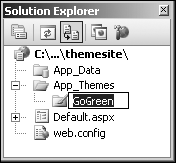
Rename Theme1 to GoGreen, as shown in Figure 10-8.
Right-click the GoGreen folder and add a skin file named Green.skin to the project (Add New ItemSkin FileAdd).
The Green.skin file opens with the ...