Skip to Content
ASP.NET 3.5 For Dummies®
book

ASP.NET 3.5 For Dummies®

by Ken Cox
February 2008
Intermediate to advanced
428 pages
8h 52m
English
For Dummies
Content preview from ASP.NET 3.5 For Dummies®

15.6. Positioning Content to Stay on Top

The AlwaysVisibleControlExtender lets you float text over the page even when the user scrolls in the browser.

NOTE

Use this control sparingly. I'd never suggest this technique for annoying advertisements, but it could be handy to park a helpful notice on the screen and update it as required.

In this section, you create the page shown in Figure 15-9. It's hard to tell from the figure, but when you scroll down the page, the advertisement informational panel stays in place.
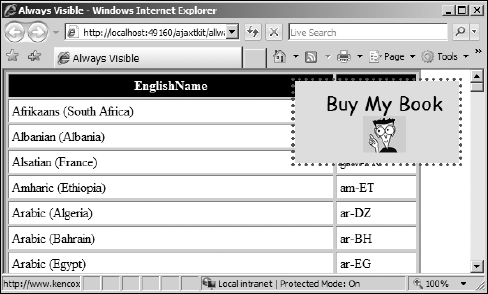
Figure 15-9. Scrolling is no escape.

15.6.1. Creating a floating style

The panel floats above the text because it uses absolute positioning within the style. In this section, you create two styles for the floating content. The first style, alwaysvisible, defines the size (in pixels) of the outer container, a dotted red border, and a light gray background.

As a recommended option, include style rules that establish a fixed position such as 350 pixels from the left side of the browser pane and 10 pixels down from the top of the pane. Providing these in the style rule helps as you design the page and avoids a screen flash at runtime.

The second style, innercontent, formats the text. Its rules include the alignment, font, size, and color. The inner container stretches to ...

Become an O’Reilly member and get unlimited access to this title plus top books and audiobooks from O’Reilly and nearly 200 top publishers, thousands of courses curated by job role, 150+ live events each month,
and much more.
Start your free trial

You might also like

ASP.NET 3.5 Unleashed

ASP.NET 3.5 Unleashed

Stephen Walther
ASP.NET 4 Unleashed

ASP.NET 4 Unleashed

Stephen Walther, Kevin Hoffman, Nate Dudek

Publisher Resources

ISBN: 9780470195925Purchase book