February 2008
Intermediate to advanced
428 pages
8h 52m
English
The Toolbox is where you store, um, tools. You use the Toolbox frequently in this book, so it helps to know its tricks.
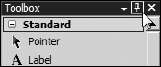
By default, the Toolbox plays peeka-boo to give you the maximum screen real estate as you work in the page editor. If you want the Toolbox to remain visible, pass your mouse over the Toolbox tab and click the pushpin so the pushpin becomes vertical, as shown in Figure 2-12.
NOTE
If the Toolbox disappears completely, choose View Toolbox.
Visual Web Developer Express doesn't support higher-end automation features that let third-party installers fill the Toolbox for you. You can still use controls that you build or buy, but you need to add components manually. As you see in the following sections, adding stuff to the Toolbox is no big deal.
This section shows how to add controls to the Toolbox by using the free AJAX Control Toolkit as an example. These same steps apply to other non-Microsoft controls but because I show you how to use the AJAX Control Toolkit extensively in Chapter 15, it's handy to have it ready.
Here's how to obtain ...
Read now
Unlock full access


 O’Reilly covers everything we've got, with content to help us build a world-class technology community, upgrade the capabilities and competencies of our teams, and improve overall team performance as well as their engagement.I wanted to learn C and C++, but it didn't click for me until I picked up an O'Reilly book. When I went on the O’Reilly platform, I was astonished to find all the books there, plus live events and sandboxes so you could play around with the technology.I’ve been on the O’Reilly platform for more than eight years. I use a couple of learning platforms, but I'm on O'Reilly more than anybody else. When you're there, you start learning. I'm never disappointed.I'm always learning. So when I got on to O'Reilly, I was like a kid in a candy store. There are playlists. There are answers. There's on-demand training. It's worth its weight in gold, in terms of what it allows me to do.