Launching Expression Blend
More often than not, you’ll make professional edits to your WPF applications by using Microsoft Expression Blend. If you’re using Visual Studio 2012, you already know that a special version of Blend is included. You can automate the process of opening the current solution in Blend by creating a custom command. Select Tools > External Tools. In the External Tools dialog, click Add. Type the command title (Expression Blend), specify the full pathname in the Command field, and enter $(SolutionFileName) in the Arguments field, as shown in Figure 1.8.
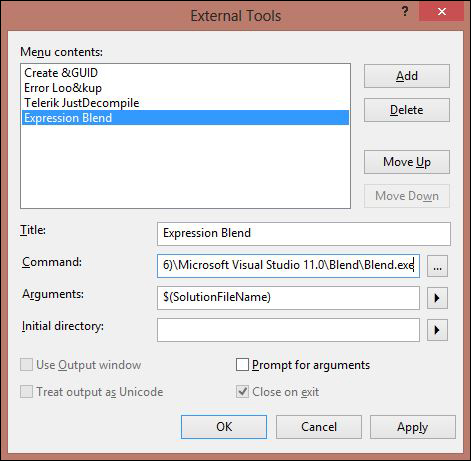
Figure 1.8. Setting Expression Blend as an external tool.
In the Tools ...
Get Hidden WPF: Secrets for Creating Great Applications in Windows Presentation Foundation now with the O’Reilly learning platform.
O’Reilly members experience books, live events, courses curated by job role, and more from O’Reilly and nearly 200 top publishers.

