December 2004
Beginner to intermediate
536 pages
19h 28m
English
Emacs has extensive online help, which is discussed further in Chapter 14. You can enter help through the lifesaver icon on the toolbar or through the Help menu. Either method will show you a help menu, described later in this section. To enter help using the keyboard, press C-h. Pressing C-h ? gives you a list of options. Pressing C-h t starts a tutorial that is an excellent introduction to Emacs.
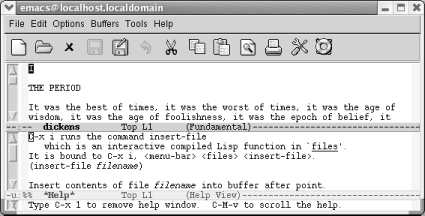
To get information about the meaning of a keystroke combination, press C-h k for describe-key. For example, if you type C-h k C-x i, Emacs displays a description of the insert-file command, which is bound to C-x i. Pressing C-h f (for describe-function) asks Emacs to describe a function (really just a command name, such as find-file). Essentially, C-h k and C-h f give you the same information; the difference is that with C-h k, you press a key whereas with C-h f, you type a command name.
Assume you want to find out about what C-x i does.
|
Type: C-h k |
|

|
|
Asking for help about a keyboard command. |
|
Type: C-x i |
|
|
|
Emacs splits the screen to display help. |
A few things to notice: the window
is
now split into two parts because you're looking at
two separate buffers. Each buffer has its own mode line. The lower
buffer is the *Help* buffer; it contains the information about the ...
Read now
Unlock full access


 O’Reilly covers everything we've got, with content to help us build a world-class technology community, upgrade the capabilities and competencies of our teams, and improve overall team performance as well as their engagement.I wanted to learn C and C++, but it didn't click for me until I picked up an O'Reilly book. When I went on the O’Reilly platform, I was astonished to find all the books there, plus live events and sandboxes so you could play around with the technology.I’ve been on the O’Reilly platform for more than eight years. I use a couple of learning platforms, but I'm on O'Reilly more than anybody else. When you're there, you start learning. I'm never disappointed.I'm always learning. So when I got on to O'Reilly, I was like a kid in a candy store. There are playlists. There are answers. There's on-demand training. It's worth its weight in gold, in terms of what it allows me to do.