December 2007
Beginner
912 pages
31h 8m
English
Few operating-system ideas are simpler or better than this one: Whenever Apple improves or fixes some piece Mac OS X or some Apple-branded program, the Software Update program can notify you, download the update, and install it into your system automatically. These updates may include new versions of programs like iPhoto and iMovie; drivers for newly released printers, scanners, cameras, and such; bug fixes and security patches; and so on.
Software Update doesn't run rampant through your system software, however. It's quietly respectful. For example, Software Update doesn't download the new software without asking your permission first and explicitly telling you what it plans to install, as shown in Figure 9-15.
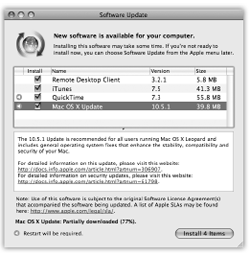
Figure 9-15. When Software Update finds an appropriate software morsel, it presents this dialog box that offers to install it automatically. (If you see a smaller version of this dialog box, with no visible list of the new components, click the Details button.) Apple has always created updated and bug-fixing versions of its software components, but they don't do you any good if you don't know about them. You no longer have to scour Mac news Web sites to discover that one of these components has been released and then hunt down the software itself.
For maximum effortlessness, turn on the "Check for updates" checkbox and then select a frequency ...
Read now
Unlock full access


 O’Reilly covers everything we've got, with content to help us build a world-class technology community, upgrade the capabilities and competencies of our teams, and improve overall team performance as well as their engagement.I wanted to learn C and C++, but it didn't click for me until I picked up an O'Reilly book. When I went on the O’Reilly platform, I was astonished to find all the books there, plus live events and sandboxes so you could play around with the technology.I’ve been on the O’Reilly platform for more than eight years. I use a couple of learning platforms, but I'm on O'Reilly more than anybody else. When you're there, you start learning. I'm never disappointed.I'm always learning. So when I got on to O'Reilly, I was like a kid in a candy store. There are playlists. There are answers. There's on-demand training. It's worth its weight in gold, in terms of what it allows me to do.