December 2007
Beginner
912 pages
31h 8m
English
Mac OS X stores the text and settings of its menus, dialog boxes, and other elements in special text files called plist (for Property List) files. They sit in one of the three Library folders (in your Home folder, the System folder, or the hard drive window).
The easiest way to edit them is to use Apple's Property List Editor, a program that came on your Mac OS X Developer CD. Once you've installed your developer tools as described on System Profiler, you can find Property List Editor in Developer→ Applications→Utilities.
There are hundreds of plist files, so some experimentation and patience is required. Most of the cool changes you can make to your plists can be made much more easily using TinkerTool, described at the beginning of this chapter. Here, however, is an example of a smaller change you can make this way.
It's called Trash, but in Mac OS X, it looks more like an office wastebasket. When inspiration on the work you're supposed to be doing runs dry, consider remedying this discrepancy by changing the name of the Trash icon to something more appropriate.
In PropertyList Editor, choose File→Open. Navigate to System→ Library→ Core Services→ Dock→ Contents→ Resources→ English.lproj→ InfoPlist.strings.
Click the Root triangle to view and edit the settings, as directed in Figure 17-5.
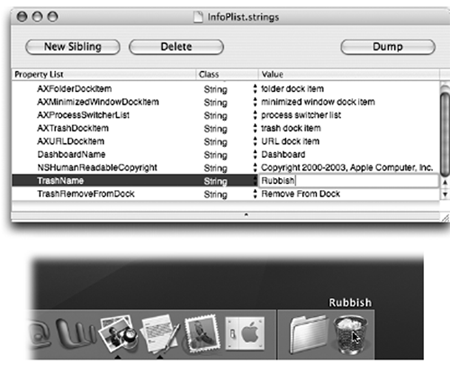
Figure 17-5. Top: This simple file contains the name of the Trash ...
Read now
Unlock full access


 O’Reilly covers everything we've got, with content to help us build a world-class technology community, upgrade the capabilities and competencies of our teams, and improve overall team performance as well as their engagement.I wanted to learn C and C++, but it didn't click for me until I picked up an O'Reilly book. When I went on the O’Reilly platform, I was astonished to find all the books there, plus live events and sandboxes so you could play around with the technology.I’ve been on the O’Reilly platform for more than eight years. I use a couple of learning platforms, but I'm on O'Reilly more than anybody else. When you're there, you start learning. I'm never disappointed.I'm always learning. So when I got on to O'Reilly, I was like a kid in a candy store. There are playlists. There are answers. There's on-demand training. It's worth its weight in gold, in terms of what it allows me to do.