October 2009
Intermediate to advanced
431 pages
9h 32m
English
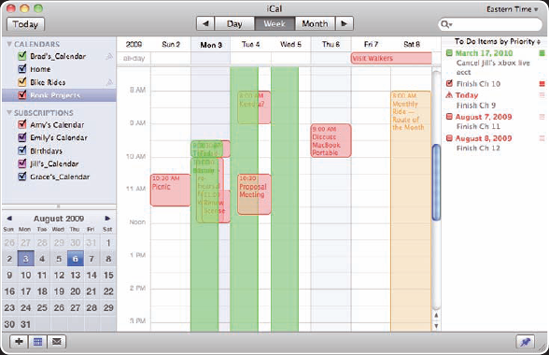
With iCal, you can manage your own time by creating calendars that help you to be where you're supposed to be when you're supposed to be there. You can also use to-do items to ensure that you accomplish important, or even not-so-important, tasks. As a personal calendar tool, iCal is very useful, and if that's all it did it would be worth using. However, iCal is also designed for calendar collaboration. You can publish calendars so that others can view your calendars in iCal running on their Macs. Likewise, you can subscribe to other people's calendars so that you see all calendar events of interest to you in one place.
iCal is a complete calendar tool that enables you to take control over your busy life and helps you coordinate with other people. In this section, you learn how to get started with iCal, from setting important preferences to configuring your calendars, events, and to-do items.
Before you jump into managing your calendars with iCal, take a few moments to configure some of its preferences so that it works the way you want. iCal's Preferences window has three tabs: General, Accounts, and Advanced.
On the General tab, here are the preferences you can set (see figure 9.1):
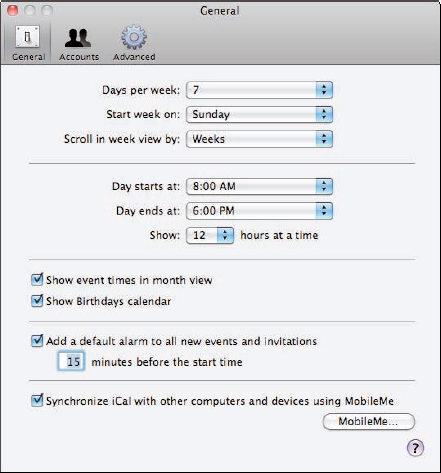
Figure 9.1. The General ...
Read now
Unlock full access


 O’Reilly covers everything we've got, with content to help us build a world-class technology community, upgrade the capabilities and competencies of our teams, and improve overall team performance as well as their engagement.I wanted to learn C and C++, but it didn't click for me until I picked up an O'Reilly book. When I went on the O’Reilly platform, I was astonished to find all the books there, plus live events and sandboxes so you could play around with the technology.I’ve been on the O’Reilly platform for more than eight years. I use a couple of learning platforms, but I'm on O'Reilly more than anybody else. When you're there, you start learning. I'm never disappointed.I'm always learning. So when I got on to O'Reilly, I was like a kid in a candy store. There are playlists. There are answers. There's on-demand training. It's worth its weight in gold, in terms of what it allows me to do.