October 2009
Intermediate to advanced
431 pages
9h 32m
English
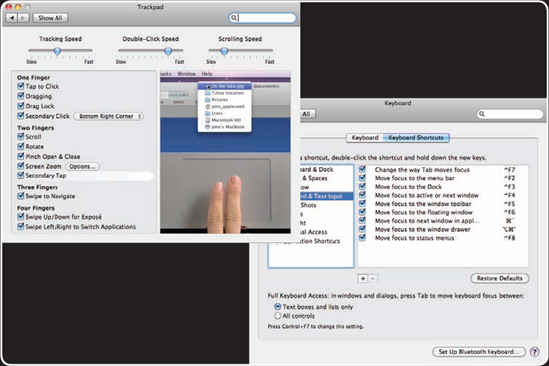
To get the most from your MacBook Pro, you should customize the keyboard and trackpad so that they work according to your preferences. And learning to use keyboard shortcuts effectively will help you work more quickly and efficiently. You might want to add a mouse or external keyboard to your toolkit, especially for those times when you are using the computer at a desk; Bluetooth mice and keyboards enable you to do this without being tethered with cables.
A trackpad is an ideal input device for a mobile computer because it provides a similar degree of control that a mouse does but doesn't require anything external to the computer. The MacBook pro trackpad provides all the basic capabilities you need to enable you to point and click, but it certainly doesn't stop there. The MacBook pro's trackpad supports gestures, which go way beyond just pointing and clicking. Using combinations of your fingers and motion, you can scroll windows, zoom in, zoom out, and so on. You can use the trackpad much more effectively by tweaking its options over time.
If you've used an iPhone, you experienced Apple multitouch technology; you can control an iPhone using normal motions of your fingers on the screen, such as a pinching motion to zoom in and out. The MacBook Pro incorporates a similar interface on its ...
Read now
Unlock full access


 O’Reilly covers everything we've got, with content to help us build a world-class technology community, upgrade the capabilities and competencies of our teams, and improve overall team performance as well as their engagement.I wanted to learn C and C++, but it didn't click for me until I picked up an O'Reilly book. When I went on the O’Reilly platform, I was astonished to find all the books there, plus live events and sandboxes so you could play around with the technology.I’ve been on the O’Reilly platform for more than eight years. I use a couple of learning platforms, but I'm on O'Reilly more than anybody else. When you're there, you start learning. I'm never disappointed.I'm always learning. So when I got on to O'Reilly, I was like a kid in a candy store. There are playlists. There are answers. There's on-demand training. It's worth its weight in gold, in terms of what it allows me to do.