October 2009
Intermediate to advanced
431 pages
9h 32m
English
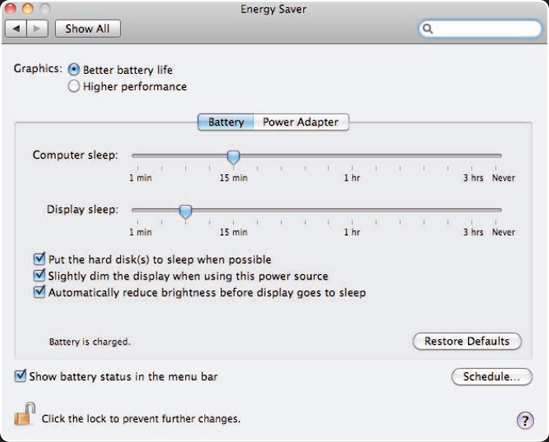
Like all devices with batteries, a MacBook Pro can operate only as long as its battery continues to provide power; fortunately, with the current models this is quite a long time. Still, once your battery runs out, your trusty MacBook Pro becomes so much dead weight to carry around. To get the most working time while you're mobile, you should practice good energy-management habits. These include a combination of using the Mac OS X battery management tools, conserving battery power, and being prepared to connect to an external power source whenever you have the opportunity.
You can use the Battery menu to keep an eye on where your MacBook Pro power level is so that you know how much working time you have left and can take action if it's clear you are going to run out of power soon.
You can configure the Battery menu on your MacBook Pro by performing the following steps:
Open the Energy Saver pane of the System Preferences application.
Select the Show battery status in the menu bar check box if it isn't selected already.
Open the Battery menu.
Select Show, and choose one of the following display options (see figure 10.1):
Icon Only. This displays the battery icon at the top of the menu when you are on battery power or charging the battery. The amount of the icon that is dark represents the battery's current ...
Read now
Unlock full access


 O’Reilly covers everything we've got, with content to help us build a world-class technology community, upgrade the capabilities and competencies of our teams, and improve overall team performance as well as their engagement.I wanted to learn C and C++, but it didn't click for me until I picked up an O'Reilly book. When I went on the O’Reilly platform, I was astonished to find all the books there, plus live events and sandboxes so you could play around with the technology.I’ve been on the O’Reilly platform for more than eight years. I use a couple of learning platforms, but I'm on O'Reilly more than anybody else. When you're there, you start learning. I'm never disappointed.I'm always learning. So when I got on to O'Reilly, I was like a kid in a candy store. There are playlists. There are answers. There's on-demand training. It's worth its weight in gold, in terms of what it allows me to do.