April 2007
Intermediate to advanced
551 pages
12h 9m
English
Windows PowerShell has two redirection operators, > and >>. A redirection operator redirects the output of a command (or pipeline) to a specified location. The > operator creates a new file and redirects text to it or, if the file exists, it overwrites the existing content. The >> operator appends text to an existing file without overwriting the existing content.
You can redirect text from the command line to a file. For example, to redirect the literal text Hello world! to a not yet existent file NonExistent.txt in the same directory use this command:
"Hello world!" > NonExistent.txt
You can check that the content has been added to the newly created file using the command:
get-content NonExistent.txt
If you then redirect new text to the file using the > operator, it overwrites the existing content, as you can demonstrate using the following commands:
"This overwrites the old text." > NonExistent.txt
get-content NonExistent.txt
But, if you use the >> operator, you can append text to the file, as you can demonstrate using the following commands:
"This appends a new line to the file." > NonExistent.txt
get-content NonExistent.txt
Figure 19-20 shows the results of executing the preceding commands in this section.
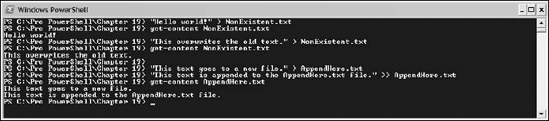
Similarly, you can use the >> redirection operator to append text to an existing file, as shown in Figure 19-20 when you execute ...
Read now
Unlock full access


 O’Reilly covers everything we've got, with content to help us build a world-class technology community, upgrade the capabilities and competencies of our teams, and improve overall team performance as well as their engagement.I wanted to learn C and C++, but it didn't click for me until I picked up an O'Reilly book. When I went on the O’Reilly platform, I was astonished to find all the books there, plus live events and sandboxes so you could play around with the technology.I’ve been on the O’Reilly platform for more than eight years. I use a couple of learning platforms, but I'm on O'Reilly more than anybody else. When you're there, you start learning. I'm never disappointed.I'm always learning. So when I got on to O'Reilly, I was like a kid in a candy store. There are playlists. There are answers. There's on-demand training. It's worth its weight in gold, in terms of what it allows me to do.