November 2000
Intermediate to advanced
216 pages
6h 3m
English
The steps performed so far have used the standard administrative tools in Windows NT. Now it’s time to work on some more advanced tasks to further enhance the security of your system. These tasks include:
Encrypting the password database
Editing the registry
Disabling unnecessary files
If an attacker gets hold of a system backup or an emergency repair disk, he could use a tool such as L0phtCrack to run a dictionary attack or a brute force attack on the Systems Account Manager (SAM) database. However, if the password hashes in the database are encrypted, these attacks will be unsuccessful.
In NT 4.0 Service Pack 3, Microsoft introduced a facility for encrypting the password hashes stored in the SAM database. This facility protects the database from offline password cracking attempts. To implement this encryption feature, run the following command:
C:\> syskey
Running syskey brings up the dialog box shown in
Figure 2.5. Note that enabling password encryption
is a one-way operation—once it is enabled, it cannot be
disabled.
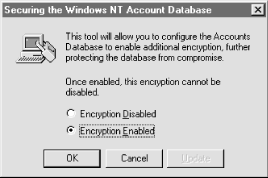
Figure 2-5. The syskey command encryption dialog box
When you enable encryption, the system creates a random 128-bit encryption key. This is used to encrypt the password hash entries in the SAM database in the registry (HKLM\SAM). The encryption key is protected with another key, called the system key ...
Read now
Unlock full access


 O’Reilly covers everything we've got, with content to help us build a world-class technology community, upgrade the capabilities and competencies of our teams, and improve overall team performance as well as their engagement.I wanted to learn C and C++, but it didn't click for me until I picked up an O'Reilly book. When I went on the O’Reilly platform, I was astonished to find all the books there, plus live events and sandboxes so you could play around with the technology.I’ve been on the O’Reilly platform for more than eight years. I use a couple of learning platforms, but I'm on O'Reilly more than anybody else. When you're there, you start learning. I'm never disappointed.I'm always learning. So when I got on to O'Reilly, I was like a kid in a candy store. There are playlists. There are answers. There's on-demand training. It's worth its weight in gold, in terms of what it allows me to do.