November 2013
Beginner to intermediate
950 pages
34h 26m
English
Don’t be deceived by the name. This app, new in Windows 8.1, does let you set up alarms, but it does more—so much more. It’s also a timer and a stopwatch.
The first time you open it, Windows asks if you want it to be your primary alarm; if you say Yes, then it will be able to get your attention by displaying notification bubbles on the screen when the time comes.
If you travel much, this feature could turn out to be one of your machine’s most useful functions. It’s reliable, it’s programmable, and it’s fun to use.
These alarms don’t go off unless your computer is turned on and awake. (A few tablets and laptops offer a feature called InstantGo; they can wake themselves to play your alarm. But otherwise, not.)
Microsoft starts you off with a dummy alarm, set to 7:15 a.m., but switched off.
To change the time, click the bullseye-shaped alarm to enter editing mode; now drag the two round handles around the circle to specify the alarm time (Figure 4-1). The inner, darker handle sets the hour; the lighter, outer one sets the minute.
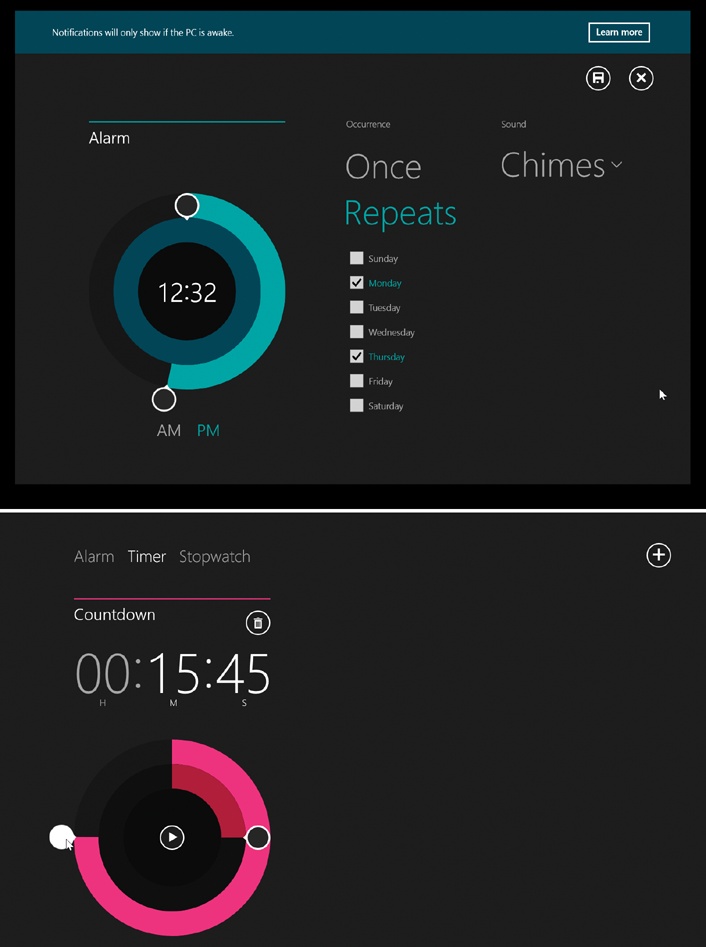
Figure 4-1. Top: The Alarm app can’t wake the computer to wake you. You should think of it more as a system to remind you of something while you’re actually working (and the computer is on and awake). Bottom: The Timer is a countdown. You can set up multiple timers, by the way; tap to set up another one. To delete one, tap it and then tap .
You ...
Read now
Unlock full access


 O’Reilly covers everything we've got, with content to help us build a world-class technology community, upgrade the capabilities and competencies of our teams, and improve overall team performance as well as their engagement.I wanted to learn C and C++, but it didn't click for me until I picked up an O'Reilly book. When I went on the O’Reilly platform, I was astonished to find all the books there, plus live events and sandboxes so you could play around with the technology.I’ve been on the O’Reilly platform for more than eight years. I use a couple of learning platforms, but I'm on O'Reilly more than anybody else. When you're there, you start learning. I'm never disappointed.I'm always learning. So when I got on to O'Reilly, I was like a kid in a candy store. There are playlists. There are answers. There's on-demand training. It's worth its weight in gold, in terms of what it allows me to do.