November 2013
Beginner to intermediate
950 pages
34h 26m
English
Some extremely sophisticated programming has gone into the typefaces that are listed in the Fonts dialog boxes of your word processor and other programs. They use OpenType and TrueType technology, meaning that no matter what point size you select for these fonts, they look smooth and professional—both on the screen and when you print.
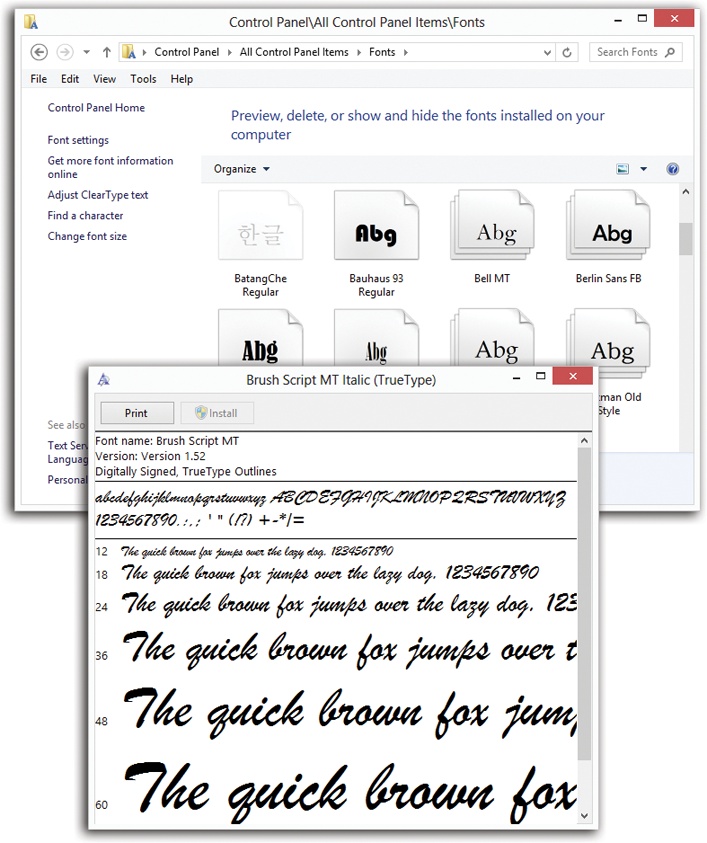
Figure 19-10. Top: All your fonts sit in the Fonts folder. You’ll frequently find an independent font file for each style of a font: bold, italic, bold italic, and so on. Bottom: To see how a font looks at various sizes and styles, double-click it.
Windows comes with several dozen great-looking fonts: Arial, Book Antiqua, Garamond, Times New Roman, and so on. But the world is filled with additional fonts. You may find them on Web sites or in the catalogs of commercial typeface companies. Sometimes you’ll find new fonts on your system after installing a new program, courtesy of its installer.
To review the files that represent your typefaces, open the Fonts icon in the Control Panel. (Switch to Large Icons or Small Icons view to see the Fonts icon.) As Figure 19-10 illustrates, it’s easy and enlightening to explore this folder.
The Fonts icon in your Control Panel window is only a shortcut to the real folder, which is in your Local Disk (C:)→Windows→Fonts folder.
To remove a font from your system, right-click it and then choose ...
Read now
Unlock full access


 O’Reilly covers everything we've got, with content to help us build a world-class technology community, upgrade the capabilities and competencies of our teams, and improve overall team performance as well as their engagement.I wanted to learn C and C++, but it didn't click for me until I picked up an O'Reilly book. When I went on the O’Reilly platform, I was astonished to find all the books there, plus live events and sandboxes so you could play around with the technology.I’ve been on the O’Reilly platform for more than eight years. I use a couple of learning platforms, but I'm on O'Reilly more than anybody else. When you're there, you start learning. I'm never disappointed.I'm always learning. So when I got on to O'Reilly, I was like a kid in a candy store. There are playlists. There are answers. There's on-demand training. It's worth its weight in gold, in terms of what it allows me to do.