November 2013
Beginner to intermediate
950 pages
34h 26m
English
Microsoft recognizes that you may not want to listen to all your songs every time you need some tunes. That’s why Media Player lets you create playlists—folders in the navigation list that contain only certain songs. In effect, you can devise your own albums, mixing and matching songs from different albums for different purposes: one called “Downer Tunes,” another called “Makeout Music,” and so on.
To create a new playlist, make sure the Play tab is selected (right side). That pane starts out empty. (If it’s not, click “Clear list” at the top.) It says, “Drag items here to create a playlist.” Well, hey—it’s worth a try. See Figure 18-8.
You can also right-click any album or song and, from the shortcut menu, choose “Add to”; the submenu lists all your existing playlists.
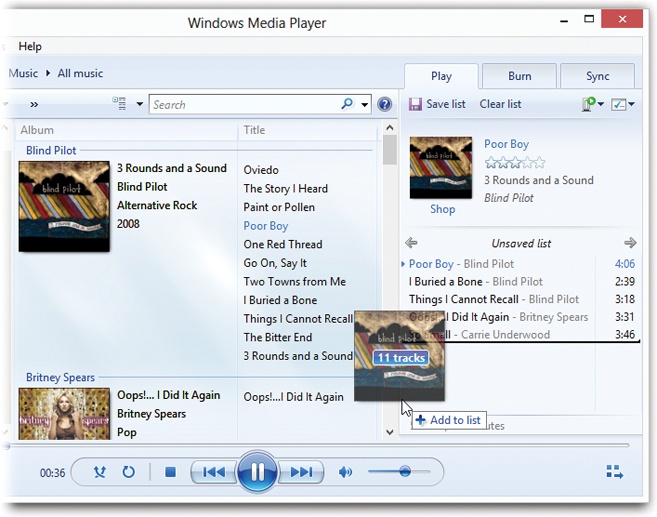
Figure 18-8. To create a playlist, just start dragging tracks or whole albums to the Playlist pane. Switch views, or use the search box, as necessary to find the tracks you want. Drag songs up and down in the Playlist pane to reorder them. Click where it now says “Untitled Playlist” to give your playlist a name. Use the upper-right pop-up menu to scramble or sort the playlist.
Once you’ve created a playlist, click “Save list” at the top of the pane. Thrill to the appearance of a new icon in the Playlists category of the navigation tree.
To create another playlist right away, close the first one by clicking ...
Read now
Unlock full access


 O’Reilly covers everything we've got, with content to help us build a world-class technology community, upgrade the capabilities and competencies of our teams, and improve overall team performance as well as their engagement.I wanted to learn C and C++, but it didn't click for me until I picked up an O'Reilly book. When I went on the O’Reilly platform, I was astonished to find all the books there, plus live events and sandboxes so you could play around with the technology.I’ve been on the O’Reilly platform for more than eight years. I use a couple of learning platforms, but I'm on O'Reilly more than anybody else. When you're there, you start learning. I'm never disappointed.I'm always learning. So when I got on to O'Reilly, I was like a kid in a candy store. There are playlists. There are answers. There's on-demand training. It's worth its weight in gold, in terms of what it allows me to do.