January 2007
Beginner
396 pages
9h 31m
English
It's time to step back and take a look at what you've accomplished so far. You've created the Bobblehead database, and added a single database object: a table named Dolls. You've filled the Dolls table with several records. You don't have the fancy windows, reports, and search routines that make a database work really smoothly, but you do have the most important ingredient—organized data.
One issue you haven't tackled yet is how you manage the objects in your database. For example, if you have more than one table, you need a way to move back and forth between the two. That tool's the navigation pane, shown in Figure 1-19.
The navigation pane shows the objects (Section 1.1) that are part of your database, and it lets you manipulate them. However, you don't necessarily see all your database objects at all times. The navigation pane has several different viewing modes, so you can home in on exactly what interests you.
When you first create a database, the navigation pane shows only the tables in your database. That's good enough for now—after all, your database doesn't contain anything but the tables you've created.
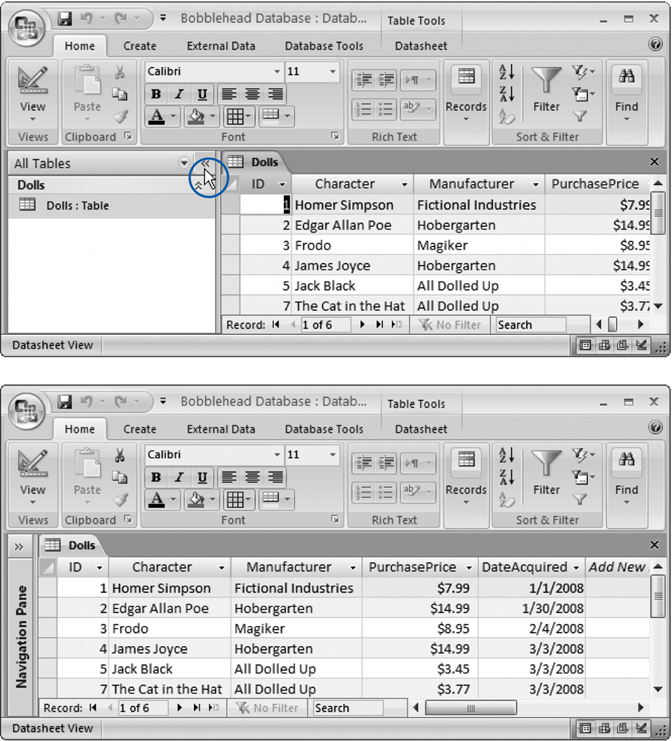
Figure 1-19. Unhappy with the space consumed by the navigation pane? Click the Open/Close but-ton in the top-right corner (top), and the navigation bar slides out of the way to give more room for the datasheet (bottom). ...
Read now
Unlock full access


 O’Reilly covers everything we've got, with content to help us build a world-class technology community, upgrade the capabilities and competencies of our teams, and improve overall team performance as well as their engagement.I wanted to learn C and C++, but it didn't click for me until I picked up an O'Reilly book. When I went on the O’Reilly platform, I was astonished to find all the books there, plus live events and sandboxes so you could play around with the technology.I’ve been on the O’Reilly platform for more than eight years. I use a couple of learning platforms, but I'm on O'Reilly more than anybody else. When you're there, you start learning. I'm never disappointed.I'm always learning. So when I got on to O'Reilly, I was like a kid in a candy store. There are playlists. There are answers. There's on-demand training. It's worth its weight in gold, in terms of what it allows me to do.