June 2010
Beginner
320 pages
9h 37m
English
At this point we have a reasonably full-featured chat application. You can log in and chat with as many users as you like, and messages are sent around in realtime, but the experience is not quite complete. After a user sends a message to another user, there isn’t a lot of feedback about what is happening. Users of modern chat applications expect to be informed about what the other user is doing. Is the user typing? Did the user start typing and stop? Is this person still online? These are the types of features that change a standard chat script into a living, breathing realtime application. Luckily, with the code that’s already written, these features are easy to implement.
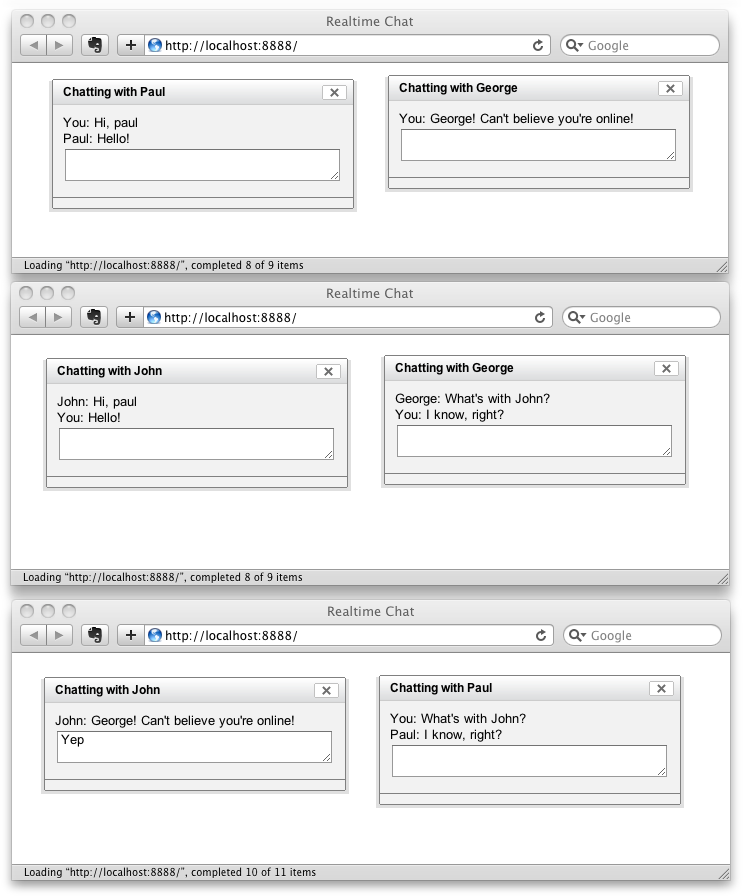
Figure 6-4. A sample chat session in multiple browser windows
When the ability to see that a user is typing was introduced into chat applications, it seemed like a little thing. But after using this feature for even a short amount of time, it became hard to remember how chatting worked without it. To enable it in this application, it’s going to take a mixture of both Python and JavaScript. In the chat-server.py file, add a new URL handler to deal with typing messages:
class Application(tornado.web.Application):
        handlers = [
            (r"/", MainHandler),
            (r"/login/?", LoginHandler),
            (r"/updates/?", UpdateHandler),
            (r"/send/?", SendHandler),
            (r"/typing/?", TypingHandler),
            ]
This will route any requests for the ...
Read now
Unlock full access


 O’Reilly covers everything we've got, with content to help us build a world-class technology community, upgrade the capabilities and competencies of our teams, and improve overall team performance as well as their engagement.I wanted to learn C and C++, but it didn't click for me until I picked up an O'Reilly book. When I went on the O’Reilly platform, I was astonished to find all the books there, plus live events and sandboxes so you could play around with the technology.I’ve been on the O’Reilly platform for more than eight years. I use a couple of learning platforms, but I'm on O'Reilly more than anybody else. When you're there, you start learning. I'm never disappointed.I'm always learning. So when I got on to O'Reilly, I was like a kid in a candy store. There are playlists. There are answers. There's on-demand training. It's worth its weight in gold, in terms of what it allows me to do.