May 2007
Intermediate to advanced
432 pages
11h 43m
English
Now that you know about the WMI tasks, let's try a real-world common problem. In this example, you want to create a process to constantly watch a directory awaiting for any file to arrive. You'll do this through the WMI Event Watcher Task. It's important to note that before you create this example, you would never want to create a process like this to endlessly loop. You'd instead want to have some sort of timeout so the package has deterministic start and stop times.
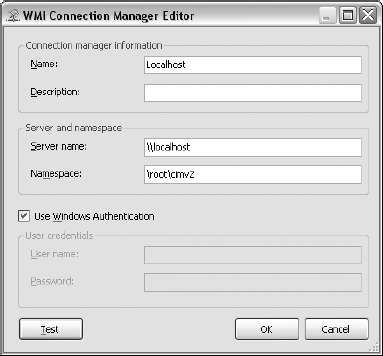
Let's start by creating a new package called FileWatcher.dtsx and create a directory under C:\ExpertSSIS called temp (C:\ExpertSSIS\temp). Start the package by dragging over a WMI Event Watcher Task and name the task Watch for File. Open the task to configure it. In the WMI Options tab, select <New Connection...> for the WMIConnection property. This opens the WMI Connection Manager Editor. Name the connection Localhost and then select the Use Windows Authentication check box, as shown in Figure 7-18.
Click Test to confirm the connection is valid and click OK to go back to the task editor. In the WMI Options tab, copy the following query into the WqlQuerySource property. You can download this query from the Wiley web site (Chapter7WMIFileWatcher.sql):
SELECT * FROM __InstanceCreationEvent WITHIN 10 WHERE TargetInstance ...
Read now
Unlock full access


 O’Reilly covers everything we've got, with content to help us build a world-class technology community, upgrade the capabilities and competencies of our teams, and improve overall team performance as well as their engagement.I wanted to learn C and C++, but it didn't click for me until I picked up an O'Reilly book. When I went on the O’Reilly platform, I was astonished to find all the books there, plus live events and sandboxes so you could play around with the technology.I’ve been on the O’Reilly platform for more than eight years. I use a couple of learning platforms, but I'm on O'Reilly more than anybody else. When you're there, you start learning. I'm never disappointed.I'm always learning. So when I got on to O'Reilly, I was like a kid in a candy store. There are playlists. There are answers. There's on-demand training. It's worth its weight in gold, in terms of what it allows me to do.