August 2007
Beginner
304 pages
7h 49m
English
Very few iPhone features have triggered as much angst, hope, and criticism as the on-screen keyboard. It's true, boys and girls: the iPhone has no physical keys. A virtual keyboard, therefore, is the only possible system for entering text.
The keyboard appears automatically whenever you tap in a place where typing is possible: in an outgoing email or text message, in the Notes program, in the address bar of the Web browser, and so on.
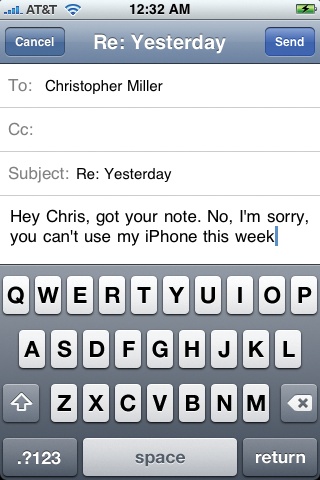
Just tap the key you want. As your finger taps the glass, a "speech balloon" appears above your finger, showing an enlarged version of the key you actually hit (since your finger is now blocking your view of the keyboard).
In darker gray, surrounding the letters, you'll find these special keys:
Shift( ). When you tap this key, it glows white, to indicate that it's in effect. The next letter you type appears as a capital. Then the key automatically returns to normal, meaning that the next letter will be lowercase.
The iPhone has a Caps Lock feature, but you have to request it. In the Settings program, turn on "Enable caps lock" as described General.
From now on, if you double-tap the key, the key turns blue. You're now in Caps Lock mode, and you'll ...
Read now
Unlock full access


 O’Reilly covers everything we've got, with content to help us build a world-class technology community, upgrade the capabilities and competencies of our teams, and improve overall team performance as well as their engagement.I wanted to learn C and C++, but it didn't click for me until I picked up an O'Reilly book. When I went on the O’Reilly platform, I was astonished to find all the books there, plus live events and sandboxes so you could play around with the technology.I’ve been on the O’Reilly platform for more than eight years. I use a couple of learning platforms, but I'm on O'Reilly more than anybody else. When you're there, you start learning. I'm never disappointed.I'm always learning. So when I got on to O'Reilly, I was like a kid in a candy store. There are playlists. There are answers. There's on-demand training. It's worth its weight in gold, in terms of what it allows me to do.