November 2006
Beginner
255 pages
6h 10m
English
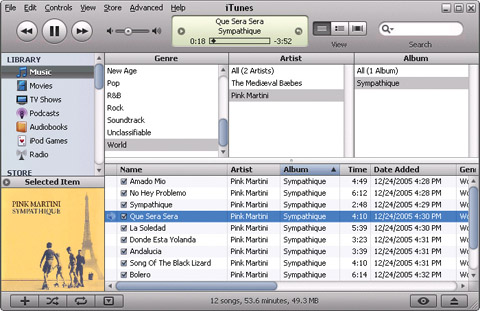
If you read Chapter 1 for a speedy way to get your iPod set up and ready to play, you’ve already dipped a toe in the iTunes waters. But as you may have guessed, beneath its pretty surface, iTunes is a deep well of media-management wonders.
Even without buying music from the online iTunes Store, you can use the program to import music from your CD collection, and add personal ratings, lyrics, and artwork to your song files. Once you check everything into your iTunes library, the program makes it easy to browse and search through all your treasures.
Yes, iTunes is a powerful program. So powerful, in fact, that this chapter is mainly going to focus on introducing you to iTunes most basic and useful tools—everything from flipping through album covers to backing up. Chapter 4 tells you how to make playlists of songs you’ve added to iTunes, Chapter 5 is all about blowing your bucks in the iTunes Store, and Chapter 6 spotlights the video side of iTunes.
But enough of the introductory blah-blah. Turn the page if you want to get to know iTunes better.
iTunes is your iPod’s best friend. You can do just about everything with your digital music here, from converting songs on a CD into iPod-ready music files, buying music, listening to Internet radio stations, watching video—and more.
Here’s a quick tour of the main iTunes window ...
Read now
Unlock full access


 O’Reilly covers everything we've got, with content to help us build a world-class technology community, upgrade the capabilities and competencies of our teams, and improve overall team performance as well as their engagement.I wanted to learn C and C++, but it didn't click for me until I picked up an O'Reilly book. When I went on the O’Reilly platform, I was astonished to find all the books there, plus live events and sandboxes so you could play around with the technology.I’ve been on the O’Reilly platform for more than eight years. I use a couple of learning platforms, but I'm on O'Reilly more than anybody else. When you're there, you start learning. I'm never disappointed.I'm always learning. So when I got on to O'Reilly, I was like a kid in a candy store. There are playlists. There are answers. There's on-demand training. It's worth its weight in gold, in terms of what it allows me to do.