September 2002
Beginner to intermediate
368 pages
9h 17m
English
The Visual Studio .NET Integrated Development Environment (IDE) is centered around an editor. An editor is much like a word processor, except that it produces simple text (without formatting, such as bold and italics). As you may recall, source code files are simple text files.
The Visual Studio .NET IDE also provides support for building Graphical User Interfaces (GUIs), which are integral to Windows and web projects. The following pages introduce some of the key features of the IDE.
The IDE is a Multiple Document Interface (MDI) application. There is a main window, and within the main window are a number of smaller windows. The central window is the text editing window. Figure 4-3 shows the basic layout.
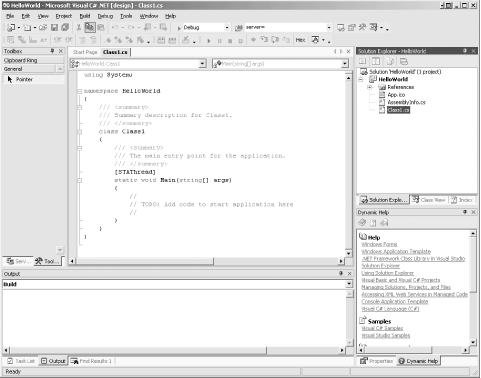
Figure 4-3. The IDE
To the left of the editing window are a number of tabbed windows that contain tools used when creating Windows and web applications. To the right of the editing window is a window called the Solution Explorer. This window shows the files in the current project and the solution to which the project belongs.
In the lower-right corner is the dynamic help window. In the lower-left corner are a number of tabbed windows, including the task list. The IDE will add tasks to this list when your program has errors that must be fixed, and you can add tasks of your own to assist you in remembering what work ...
Read now
Unlock full access


 O’Reilly covers everything we've got, with content to help us build a world-class technology community, upgrade the capabilities and competencies of our teams, and improve overall team performance as well as their engagement.I wanted to learn C and C++, but it didn't click for me until I picked up an O'Reilly book. When I went on the O’Reilly platform, I was astonished to find all the books there, plus live events and sandboxes so you could play around with the technology.I’ve been on the O’Reilly platform for more than eight years. I use a couple of learning platforms, but I'm on O'Reilly more than anybody else. When you're there, you start learning. I'm never disappointed.I'm always learning. So when I got on to O'Reilly, I was like a kid in a candy store. There are playlists. There are answers. There's on-demand training. It's worth its weight in gold, in terms of what it allows me to do.