September 2005
Intermediate to advanced
576 pages
14h 23m
English
The hardest part of any project, for me, is getting started. There is a simple problem of mental inertia that is overcome only by firing up Visual Studio 2005 and dragging some controls onto a form.
To begin, start Visual Studio 2005 and create a Visual Basic 2005 Windows application, as shown in Figure 1-4. (If you are already in Visual Studio 2005, choose File → New project.)
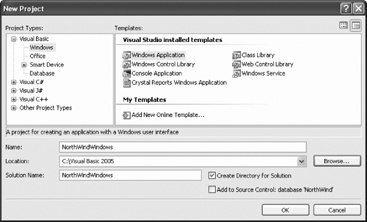
Figure 1-4. Creating the new project
Visual Studio 2005 has short-cut keys for almost every important command. These key combinations are configurable, however, and it would be confusing to include short-cut keys in this book when yours may be different. The best way to learn the short-cut key combinations is to look at the menu choices as you go.
Once the project is created, you are put into the Designer, with a blank form (titled Form1). The Toolbox is typically on the left, the Solution explorer and Properties windows are usually on the right, and a number of other useful windows may be minimized on the bottom, as shown in Figure 1-5.
You can rearrange all of these Visual Studio elements by dragging and dropping the various windows. While you are in the editor, drag one of the windows from its docked position. As soon as you begin to move the window around, the docking diamond appears, as seen in Figure 1-6.
As you move the window, the four arrows of the diamond point ...
Read now
Unlock full access


 O’Reilly covers everything we've got, with content to help us build a world-class technology community, upgrade the capabilities and competencies of our teams, and improve overall team performance as well as their engagement.I wanted to learn C and C++, but it didn't click for me until I picked up an O'Reilly book. When I went on the O’Reilly platform, I was astonished to find all the books there, plus live events and sandboxes so you could play around with the technology.I’ve been on the O’Reilly platform for more than eight years. I use a couple of learning platforms, but I'm on O'Reilly more than anybody else. When you're there, you start learning. I'm never disappointed.I'm always learning. So when I got on to O'Reilly, I was like a kid in a candy store. There are playlists. There are answers. There's on-demand training. It's worth its weight in gold, in terms of what it allows me to do.