September 2005
Intermediate to advanced
576 pages
14h 23m
English
To get started, let's create a web application named WebNorthWind. Open Visual Studio 2005. Click on New Web Site and in the drop-down menus, choose FileSystem, filling in an appropriate file location. Make sure the language is set to Visual Basic, as shown in Figure 8-2.
Visual Studio 2005 will create a filesystem-based web site (you will not find the web site listed under IIS Management) and will create a file, Default.aspx, that represents the first ASP.NET form. The editor will open, and the web Toolbox will be visible (if
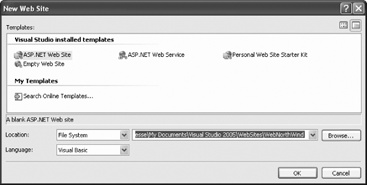
Figure 8-2. Creating a new web site
not, you can make it visible through the View window). The toolbox, like all windows, can be "pinned" in place by clicking on the thumbtack.
Depending on how you've configured your system, you'll probably find yourself in the Source view, with a tabbed window allowing you to switch to WYSIWYG (What You See Is What You Get) Design view, as shown in Figure 8-3.
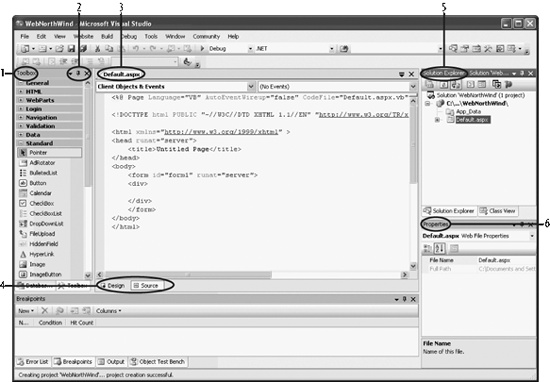
Figure 8-3. Web development editor
I've circled and numbered six areas of this screen:
The Toolbox , which consists of multiple drop-down collections of controls you can add to your application (the standard collection is visible). You can right-click in any one of these collections to pick a menu choice that will sort them alphabetically, as has been done here. ...
Read now
Unlock full access


 O’Reilly covers everything we've got, with content to help us build a world-class technology community, upgrade the capabilities and competencies of our teams, and improve overall team performance as well as their engagement.I wanted to learn C and C++, but it didn't click for me until I picked up an O'Reilly book. When I went on the O’Reilly platform, I was astonished to find all the books there, plus live events and sandboxes so you could play around with the technology.I’ve been on the O’Reilly platform for more than eight years. I use a couple of learning platforms, but I'm on O'Reilly more than anybody else. When you're there, you start learning. I'm never disappointed.I'm always learning. So when I got on to O'Reilly, I was like a kid in a candy store. There are playlists. There are answers. There's on-demand training. It's worth its weight in gold, in terms of what it allows me to do.