March 2005
Beginner
150 pages
3h 23m
English
SharePoint Services supports shared workspaces, which allow users to work collaboratively on documents. SharePoint supports two types of shared workspaces:
A document workspace site focuses on one or more documents that users can work on collaboratively.
Meeting workspace sites are used to store all the information and material needed for meetings.
When you open a shared workspace document in Microsoft Office 2003, the SharePoint Services shared workspace menu is displayed in the Office task pane alongside the document. Integrating the SharePoint shared workspaces menu provides access to all of the SharePoint Services associated with the site where the document is stored without leaving the Office environment.
Figure 5-3 shows a typical Word file opened from a shared workspace. The shared workspace menu (on the righthand side) provides collaboration options made possible by SharePoint Services and shows the online status of all team members.
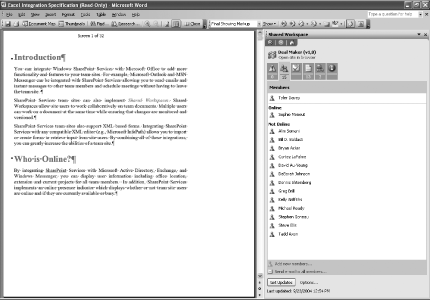
Figure 5-3. Shared workspace
Other icons provide access to additional features supported by the site, such as a task list or alerts.
The shared workspace menu implements the following SharePoint Web Parts:
The status Web Part displays any changes in the status of the document.
The document library gives a user access to any documents ...
Read now
Unlock full access


 O’Reilly covers everything we've got, with content to help us build a world-class technology community, upgrade the capabilities and competencies of our teams, and improve overall team performance as well as their engagement.I wanted to learn C and C++, but it didn't click for me until I picked up an O'Reilly book. When I went on the O’Reilly platform, I was astonished to find all the books there, plus live events and sandboxes so you could play around with the technology.I’ve been on the O’Reilly platform for more than eight years. I use a couple of learning platforms, but I'm on O'Reilly more than anybody else. When you're there, you start learning. I'm never disappointed.I'm always learning. So when I got on to O'Reilly, I was like a kid in a candy store. There are playlists. There are answers. There's on-demand training. It's worth its weight in gold, in terms of what it allows me to do.