September 2004
Intermediate to advanced
712 pages
24h 45m
English
An XSL-FO document describes the layout of a series of nested rectangular areas (boxes, for short) that are placed on one or more pages. These boxes contain text or occasionally other items, such as an external image or a horizontal rule. There are four kinds of areas:
Block areas
Inline areas
Line areas
Glyph areas
Block and inline areas are created by particular elements in the
formatting objects document. Line and glyph areas are created by the
formatter as necessary. For the most part, the rendering engine
decides exactly where to place the areas and how big to make them
based on their contents. However, you can specify properties for these
areas that adjust both their relative and absolute position, spacing,
and size on a page. Most of the time, the individual areas don’t
overlap. However, they can be forced to do so by setting the
properties absolute-position,
left, bottom, right, and top.
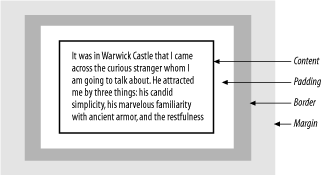
Considered by itself, each box has a content area in which its content, generally text but possibly an image or a rule, is placed. This content area is surrounded by a padding area of blank space. An optional border can surround the padding. The size of the area is the combined size of the border, padding, and content. The box may also have a margin that adds blank space outside the box’s area, as diagramed in Figure 14-1.
Read now
Unlock full access


 O’Reilly covers everything we've got, with content to help us build a world-class technology community, upgrade the capabilities and competencies of our teams, and improve overall team performance as well as their engagement.I wanted to learn C and C++, but it didn't click for me until I picked up an O'Reilly book. When I went on the O’Reilly platform, I was astonished to find all the books there, plus live events and sandboxes so you could play around with the technology.I’ve been on the O’Reilly platform for more than eight years. I use a couple of learning platforms, but I'm on O'Reilly more than anybody else. When you're there, you start learning. I'm never disappointed.I'm always learning. So when I got on to O'Reilly, I was like a kid in a candy store. There are playlists. There are answers. There's on-demand training. It's worth its weight in gold, in terms of what it allows me to do.