June 2005
Beginner
88 pages
1h 32m
English
SharePoint is a component in Windows Server 2003 that lets you share Microsoft Office documents with others through web pages. SharePoint sites are designed to be highly dynamic. Team members can easily upload documents, add public announcements, send alerts, track work items, and call meetings right from within Office 2003. SharePoint solves four main problems:
It's difficult to keep track of all the documents in even a small office.
Email isn't a great way to share files.
We work all over the place.
It's hard to create/maintain web sites on your own.
Figure 1-1 illustrates a distributed filesystem in which O'Reilly (my publisher) can share access to the same files I am working on, even though I live in Florida and they are in Massachusetts and California (and sometimes in between).
The files are synchronized over the Internet whenever the file is opened or closed. If Simon (my editor) finds himself somewhere without a good network connection, he can cancel getting the updates but still work on the file—as long as he promises to synchronize it later!
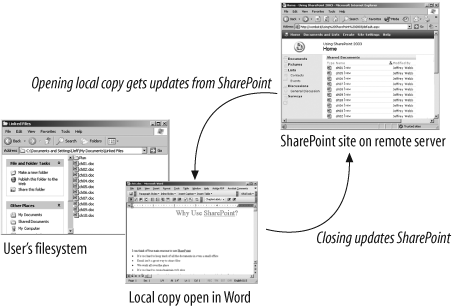
Figure 1-1. Local copies can be linked to SharePoint documents
For me, SharePoint replaced zipping files together and then emailing them chapter by chapter as they were completed, reviewed, or changed. In some cases, the zip files were very large and bounced back from the mail server, putting the "dead" ...
Read now
Unlock full access


 O’Reilly covers everything we've got, with content to help us build a world-class technology community, upgrade the capabilities and competencies of our teams, and improve overall team performance as well as their engagement.I wanted to learn C and C++, but it didn't click for me until I picked up an O'Reilly book. When I went on the O’Reilly platform, I was astonished to find all the books there, plus live events and sandboxes so you could play around with the technology.I’ve been on the O’Reilly platform for more than eight years. I use a couple of learning platforms, but I'm on O'Reilly more than anybody else. When you're there, you start learning. I'm never disappointed.I'm always learning. So when I got on to O'Reilly, I was like a kid in a candy store. There are playlists. There are answers. There's on-demand training. It's worth its weight in gold, in terms of what it allows me to do.