October 1999
Beginner
410 pages
10h 45m
English
In this example, we create a simple but useful item selection program. The purpose of this program is to make selecting an item such as a word, sentence, line, paragraph, field, column, or table as easy as possible.
In particular, by pressing a hotkey (I use Alt-S), the dialog box in Figure 20-6 will appear. While this dialog box is showing, a single key (no need even to use the Alt key) will make a selection. For instance, striking the S key will select (highlight) the sentence that contains the insertion point.
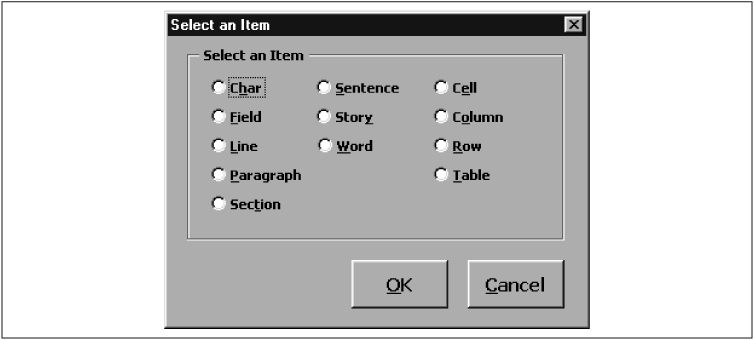
Figure 20-6. Select an Item dialog box
The form is similar in design to the form used in the letter closing example, so I will leave the details to you. The entire code is listed in Example 20-7.
Example 20-7. Source Code for the Select an Item Dialog Box
Private Sub cmdCancel_Click()
   Unload Me
End Sub

Private Sub cmdOK_Click()
Dim fld As Field
If optItemCell Then
   Selection.Expand wdCell ElseIf optItemCharacter Then Selection.Expand wdCharacter ElseIf optItemColumn Then Selection.Expand wdColumn ElseIf optItemField Then For Each fld In ActiveDocument.Fields If Selection.Range.InRange(fld.Result) Then fld.Select Exit For End If Next ElseIf optItemLine Then Selection.Expand wdLine ElseIf optItemParagraph Then Selection.Expand wdParagraph ElseIf optItemRow Then Selection.Expand wdRow ElseIf optItemSection Then Selection.Expand wdSection ElseIf optItemSentence ...
Read now
Unlock full access


 O’Reilly covers everything we've got, with content to help us build a world-class technology community, upgrade the capabilities and competencies of our teams, and improve overall team performance as well as their engagement.I wanted to learn C and C++, but it didn't click for me until I picked up an O'Reilly book. When I went on the O’Reilly platform, I was astonished to find all the books there, plus live events and sandboxes so you could play around with the technology.I’ve been on the O’Reilly platform for more than eight years. I use a couple of learning platforms, but I'm on O'Reilly more than anybody else. When you're there, you start learning. I'm never disappointed.I'm always learning. So when I got on to O'Reilly, I was like a kid in a candy store. There are playlists. There are answers. There's on-demand training. It's worth its weight in gold, in terms of what it allows me to do.