Skip to Content
Azure Networking Cookbook
book

Azure Networking Cookbook

by Mustafa Toroman
March 2019
Intermediate to advanced
234 pages
8h 14m
English
Packt Publishing
Content preview from Azure Networking Cookbook

How to do it...

To create a new NSG deny rule using the Azure portal, we must follow these steps:

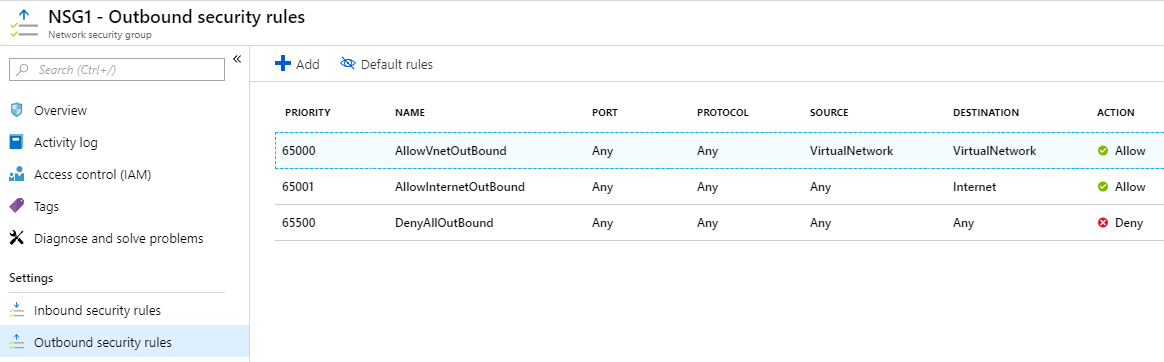
  1. In the NSG blade, locate the Outbound security rules option under Settings.
  2. Click on the Add button at the top of the page and wait for the new blade to open:
  1. In the new blade, we need to provide information for Source (location and port), Destination (location and port), Protocol, Action, Priority, Name, and Description. If you want to deny traffic, make sure you select Deny for Action. An example of how to create a rule to deny traffic over the 22 port is shown in the following screenshot:
Become an O’Reilly member and get unlimited access to this title plus top books and audiobooks from O’Reilly and nearly 200 top publishers, thousands of courses curated by job role, 150+ live events each month,
and much more.
Start your free trial

You might also like

Azure Networking Cookbook, Second Edition - Second Edition

Azure Networking Cookbook, Second Edition - Second Edition

Mustafa Toroman, Kapil Bansal Kumar Bansal, Rithin Skaria
Azure Serverless Computing Cookbook - Third Edition

Azure Serverless Computing Cookbook - Third Edition

Praveen Kumar Sreeram, Kasam Shaikh, Greg Leonardo

Publisher Resources

ISBN: 9781789800227Supplemental Content