November 2007
Beginner
642 pages
15h 43m
English
You're ready to start stuffing more users into your OpenLDAP directory. How do you do this?
Make sure your OpenLDAP server is running. Next, create an LDIF file containing your new user entries, then use ldapadd to export them into your OpenLDAP directory.
We're going to expand our directory structure a bit, because
right now it's just a plain old one-level directory. We want to be
organized and not just dump everything into the top level, so we're
going to add a people
Organizational Unit (OU). Our directory now looks like Figure 12-4.
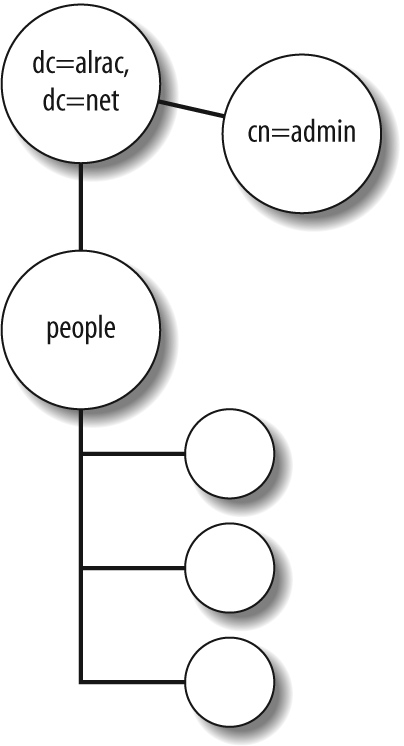
Figure 12-4. Adding one new OU with users
You can see our admin user hanging out there all alone. (It's lonely at the top.)
This example users.ldif file adds the new OU and two human users. Mind your whitespace! Comments must be on separate lines, there must be one space after each colon, and a blank line separates entries:
##/etc/ldap/ldif/users.ldif dn: ou=people,dc=alrac,dc=net ou: people description: All people in organisation objectClass: organizationalUnit dn: uid=cschroder,ou=people,dc=alrac,dc=net objectClass: inetOrgPerson cn: Carla Schroder sn: Schroder uid: cschroder userPassword: password telephoneNumber: 444-222-3333 homePhone: 555-111-2222 mail: carla@bratgrrl.com mail: carla@gmail.com description: indescribable dn: uid=thanson,ou=people,dc=alrac,dc=net objectClass: inetOrgPerson cn: ...
Read now
Unlock full access


 O’Reilly covers everything we've got, with content to help us build a world-class technology community, upgrade the capabilities and competencies of our teams, and improve overall team performance as well as their engagement.I wanted to learn C and C++, but it didn't click for me until I picked up an O'Reilly book. When I went on the O’Reilly platform, I was astonished to find all the books there, plus live events and sandboxes so you could play around with the technology.I’ve been on the O’Reilly platform for more than eight years. I use a couple of learning platforms, but I'm on O'Reilly more than anybody else. When you're there, you start learning. I'm never disappointed.I'm always learning. So when I got on to O'Reilly, I was like a kid in a candy store. There are playlists. There are answers. There's on-demand training. It's worth its weight in gold, in terms of what it allows me to do.