November 2007
Beginner
642 pages
15h 43m
English
You created your Fedora boot CD or USB stick, and now you're ready to start your installation. What next?
Before you boot the installer, have a second Internet-connected computer handy. Or, first visit the Fedora mirrors page (http://fedora.redhat.com/download/mirrors.html), and write down some mirrors that are close to you. You'll need the complete file-path to the installation directory, for example:
ftp://mirrors.kernel.org/fedora/releases/7/Fedora/i386/os
Next, pop in your boot media, and boot up the system. Your first choice is to start the installer using either graphical mode or text mode. The main difference is you won't have a mouse in text mode. The graphical installer requires a minimum of 192 MB of RAM.
Go through the initial screens; there is nothing dramatic here, just the usual keyboard, language, and networking setup. The fun begins when you get to the "Installation Method" screen. Select either FTP or HTTP. Figure 16-1 shows the FTP screen.
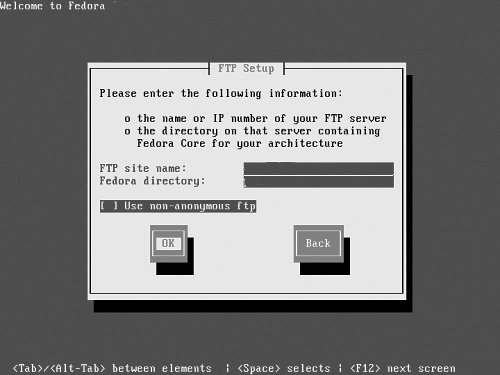
Figure 16-1. Selecting your FTP installation mirror
Entering the correct site name and Fedora directory is the same for FTP and HTTP. On the site name line, enter the top-level domain name, such as ftp://mirrors.kernel.org. On the Fedora Core directory line, enter the filepath, such as /fedora/releases/7/Fedora/i386/os, then hit OK. If you did it right, the ...
Read now
Unlock full access


 O’Reilly covers everything we've got, with content to help us build a world-class technology community, upgrade the capabilities and competencies of our teams, and improve overall team performance as well as their engagement.I wanted to learn C and C++, but it didn't click for me until I picked up an O'Reilly book. When I went on the O’Reilly platform, I was astonished to find all the books there, plus live events and sandboxes so you could play around with the technology.I’ve been on the O’Reilly platform for more than eight years. I use a couple of learning platforms, but I'm on O'Reilly more than anybody else. When you're there, you start learning. I'm never disappointed.I'm always learning. So when I got on to O'Reilly, I was like a kid in a candy store. There are playlists. There are answers. There's on-demand training. It's worth its weight in gold, in terms of what it allows me to do.