November 2007
Beginner
642 pages
15h 43m
English
You want to create a customized version of Fedora Linux for multiple local installations. You want to select a standard set of packages, and then have an easy way to install it for new users.
Kickstart (Fedora's customization tool) and your own local installation server are just what you need. A Kickstart file is created automatically at installation, so you can see one at /root/anaconda-ks.cfg on any Fedora system. This file answers all the questions asked by the installer, so all you do is point the installer to the Kickstart file and let it do the rest.
One way to create a Kickstart file is to perform a custom installation: select exactly the packages you want, set up partitioning and filesystems, and then use the automatically generated Kickstart file for new installations. This is also a great way to create an example file for reference.
Another way to is install the Kickstart configurator:
# yum install system-config-kickstartThis gives you a nice, easy-to-use graphical configurator, as Figure 16-2 shows.
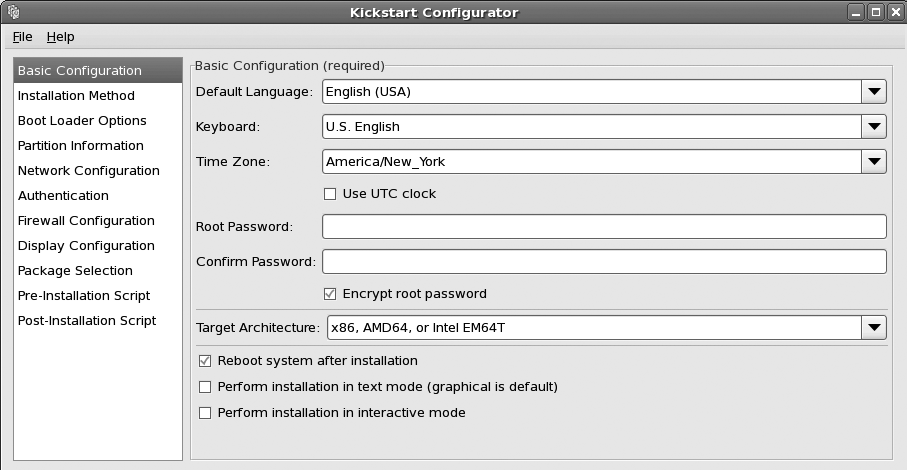
Figure 16-2. The Kickstart configuration tool
Just go through the tabs in order, and when you're finished, you'll have a ks.cfg file. You may use it as-is, or edit it manually to add further refinements.
The Kickstart configurator has some limitations. You may select only package groups, not individual ...
Read now
Unlock full access


 O’Reilly covers everything we've got, with content to help us build a world-class technology community, upgrade the capabilities and competencies of our teams, and improve overall team performance as well as their engagement.I wanted to learn C and C++, but it didn't click for me until I picked up an O'Reilly book. When I went on the O’Reilly platform, I was astonished to find all the books there, plus live events and sandboxes so you could play around with the technology.I’ve been on the O’Reilly platform for more than eight years. I use a couple of learning platforms, but I'm on O'Reilly more than anybody else. When you're there, you start learning. I'm never disappointed.I'm always learning. So when I got on to O'Reilly, I was like a kid in a candy store. There are playlists. There are answers. There's on-demand training. It's worth its weight in gold, in terms of what it allows me to do.