January 2002
Intermediate to advanced
288 pages
8h 45m
English
Any identifiable net community has at least one common interest, and individual members have their own unique likes and needs. Slash provides several tools by which users can adapt site presentation to their liking. To achieve this, site Authors and administrators have to provide sufficient metainformation. One such category is the classification of Stories into Topics and Sections. As mentioned in Section 1.3.1 in Chapter 1, this allows users to view or exclude Stories by category.
The site theme will govern the necessary Topics and Sections. The default Slash theme includes three Sections (Articles, Features, and Slash) and four Topics (Slash, Slashdot, News, and Linux). This chapter explains how and why to replace or to supplement the default categories.
The Topics link appears in the Admin menu for Authors with a seclev of 10,000. It links to the Topics Editor page (see Figure 7-1). A pop-up menu at the top of the form lists the currently defined Topics by name. Choose any Topic and click Select Topic to edit it. This will reload the same page with the Topic information, including the currently selected Topic image.
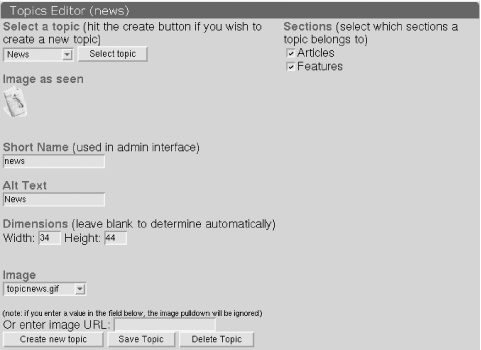
Figure 7-1. The Topics Editor page
Slash automatically assigns Topics unique identifiers, used internally. These values are not appropriate for display purposes, so the Short Name field ...
Read now
Unlock full access


 O’Reilly covers everything we've got, with content to help us build a world-class technology community, upgrade the capabilities and competencies of our teams, and improve overall team performance as well as their engagement.I wanted to learn C and C++, but it didn't click for me until I picked up an O'Reilly book. When I went on the O’Reilly platform, I was astonished to find all the books there, plus live events and sandboxes so you could play around with the technology.I’ve been on the O’Reilly platform for more than eight years. I use a couple of learning platforms, but I'm on O'Reilly more than anybody else. When you're there, you start learning. I'm never disappointed.I'm always learning. So when I got on to O'Reilly, I was like a kid in a candy store. There are playlists. There are answers. There's on-demand training. It's worth its weight in gold, in terms of what it allows me to do.