August 2006
Beginner to intermediate
496 pages
17h 36m
English
You should see how pages on your site print before embarking on a print-specific redesign. Often, all the information on a Web page prints without problems, so you may not have to add a printer style sheet to your site. But in some cases, especially when using heavy doses of CSS, pages look awful printed, like the example in Figure 13-1. But even if a page looks the same in print as it does on the screen, you have many ways to improve the quality of the printed version by adding custom printer-only styles (see Figure 13-2).
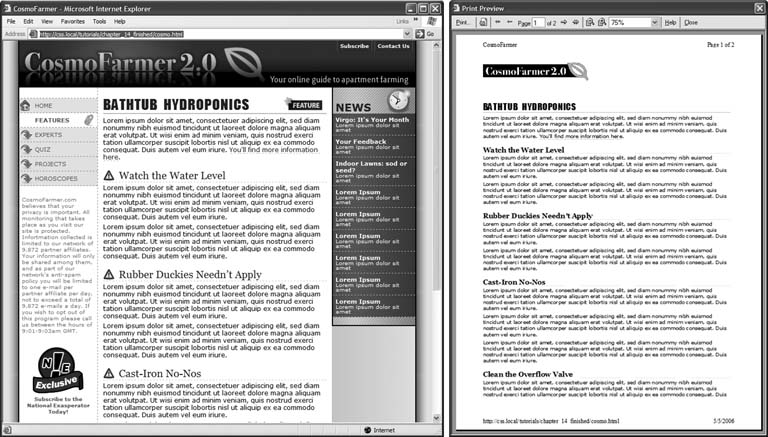
Figure 13-2. When printing a Web page, you really don't need navigation links or information that's not related to the topic at hand. With a printer style sheet, you can eliminate sidebars, navigation bars, and other content designed for Web browsing (left). The result is a simply formatted document—perfect for printing (right).
A quick way to see how a page will print without wasting a lot of paper and toner, is to use your browser's Print Preview command. On Windows this is usually available from a Web browser's File → Print Preview menu. On Macs, you usually first choose File → Print, and then in the window that appears click Preview. Using Print Preview you can check to see whether a page is too wide to fit on one page and see where page breaks occur.
As mentioned earlier, it's often ...
Read now
Unlock full access


 O’Reilly covers everything we've got, with content to help us build a world-class technology community, upgrade the capabilities and competencies of our teams, and improve overall team performance as well as their engagement.I wanted to learn C and C++, but it didn't click for me until I picked up an O'Reilly book. When I went on the O’Reilly platform, I was astonished to find all the books there, plus live events and sandboxes so you could play around with the technology.I’ve been on the O’Reilly platform for more than eight years. I use a couple of learning platforms, but I'm on O'Reilly more than anybody else. When you're there, you start learning. I'm never disappointed.I'm always learning. So when I got on to O'Reilly, I was like a kid in a candy store. There are playlists. There are answers. There's on-demand training. It's worth its weight in gold, in terms of what it allows me to do.