May 2011
Beginner
408 pages
10h 27m
English
Social plugins are a nice, easy way to build a Facebook-integrated Web site on the fly with little effort by anyone who can do a simple copy and paste. In the past, Facebook provided Facebook Markup Language (FBML), a tag language giving shortcuts to things like comment boxes and simple nav bar structures and other shortcuts in your code. Social plugins are Facebook's next evolution in this, moving from FBML to simple HTML iFrames; you can copy and paste these little pieces of Facebook into any HTML document on or off Facebook.com
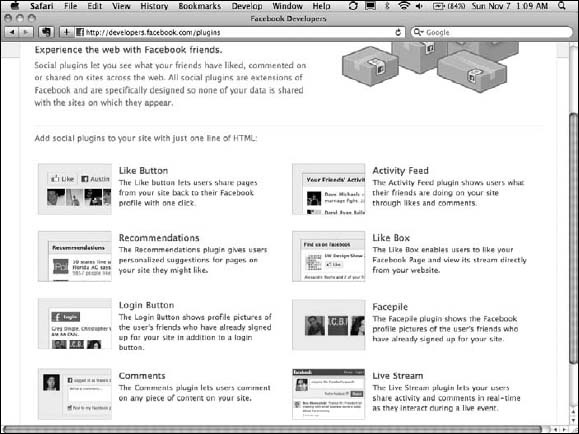
Before you start working with social plugins, go to http://developers.facebook.com/plugins and look at the various plugins that Facebook has available.(See Figure 6-1.) By the time you read this, you will probably find many more than those I mention here.
The best way to convince you that social plugins are valuable is by working with them directly, right on Facebook itself. If you do anything in this chapter, I want you to try this exercise, and I promise that you'll see the benefit of integrating Facebook on your site almost immediately!
Figure 6-1: Facebook offers a range of social plugins that you can choose from.
To see the full potential of social plugins, follow these steps:
On the following page, you'll ...
Read now
Unlock full access


 O’Reilly covers everything we've got, with content to help us build a world-class technology community, upgrade the capabilities and competencies of our teams, and improve overall team performance as well as their engagement.I wanted to learn C and C++, but it didn't click for me until I picked up an O'Reilly book. When I went on the O’Reilly platform, I was astonished to find all the books there, plus live events and sandboxes so you could play around with the technology.I’ve been on the O’Reilly platform for more than eight years. I use a couple of learning platforms, but I'm on O'Reilly more than anybody else. When you're there, you start learning. I'm never disappointed.I'm always learning. So when I got on to O'Reilly, I was like a kid in a candy store. There are playlists. There are answers. There's on-demand training. It's worth its weight in gold, in terms of what it allows me to do.