January 2002
Beginner
238 pages
6h 20m
English
Our Canadian friend has always wanted to see the New York Public Library. She gets directions at the information booth: “Make a right on 42nd Street; walk three blocks; look for the lions in front of the library.” The information-booth attendant may have no idea that the library is closed that day, or that the sidewalk on 42nd Street is blocked just then because of fire trucks and 41st Street may be the preferable route. The information booth has given the same directions to the library for the last hundred years and hopefully will for hundreds more -- the route from Grand Central Station to the library, in other words, is static.
In a similar vein, a network administrator can create a static route.
So, to reach network 146.1.0.0, we may add the
command:
ip route 146.1.0.0 255.255.0.0 1.1.1.2
which says to get to network 146.1.0.0/16, go to
the next hop of 1.1.1.2. This specifies a fixed
path to 146.1.0.0/16, as shown here, where the
contents of the routing table are displayed using the
EXEC command show ip
route:
  R#sh ip route
  ...

1 S    146.1.0.0/16 [1/0] via 1.1.1.2
Even if 1.1.1.2 goes down, an alternate
path -- shown via R2 in Figure 1-3 -- cannot be used until a second static
route is specified:
ip route 146.1.0.0 255.255.0.0 1.1.1.3
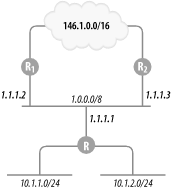
Figure 1-3. Router R’s connectivity to 146.1.0.0
The syntax of the static route command is:
ip routenetwork[mask] {address | interface} ...
Read now
Unlock full access


 O’Reilly covers everything we've got, with content to help us build a world-class technology community, upgrade the capabilities and competencies of our teams, and improve overall team performance as well as their engagement.I wanted to learn C and C++, but it didn't click for me until I picked up an O'Reilly book. When I went on the O’Reilly platform, I was astonished to find all the books there, plus live events and sandboxes so you could play around with the technology.I’ve been on the O’Reilly platform for more than eight years. I use a couple of learning platforms, but I'm on O'Reilly more than anybody else. When you're there, you start learning. I'm never disappointed.I'm always learning. So when I got on to O'Reilly, I was like a kid in a candy store. There are playlists. There are answers. There's on-demand training. It's worth its weight in gold, in terms of what it allows me to do.