July 2009
Intermediate to advanced
464 pages
12h 25m
English
Since touch is the primary indicator of action, it is critical to
style scenes optimally for touchability. Here are some strategies that you should consider for
creating large, gapless hit targets.
The elements in your scene may appear to be small and separate from each other, but their touch targets should be as large as possible. Touch targets in rows should be as tall as the row itself. You should maximize the size of the touch targets and there should be no gaps between targets.
Visual elements can be smaller than touch elements, so you might wrap the image div with a touch div. An example is the camera button, where the image is 80 × 60, but the div’s width is set 20 pixels wider:
.capture-button {
  width: 80px;
  height: 80px;
  background: url(../images/menu-capture.png) top left no-repeat;
  position: absolute;
  left: 120px;
}
You can see in Figure 7-8 that there is no visible indication of the larger touch target.
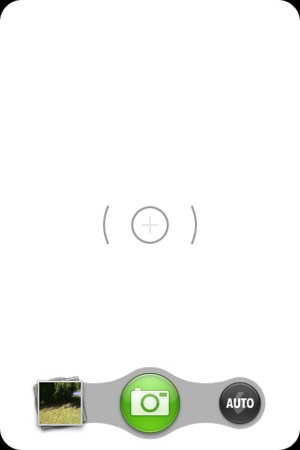
Figure 7-8. Camera button and touch target
Use the x-mojo-touch-feedback
attribute to make all touch targets reflect touches (in lieu of HTML
focus attributes). Using conventional focus would result in highlights
while dragging or scrolling items on the screen, while x-mojo-touch-feedback adds a delay on focus so
that incidental touches won’t cause a highlight. For example, in the News application, we used a momentary ...
Read now
Unlock full access


 O’Reilly covers everything we've got, with content to help us build a world-class technology community, upgrade the capabilities and competencies of our teams, and improve overall team performance as well as their engagement.I wanted to learn C and C++, but it didn't click for me until I picked up an O'Reilly book. When I went on the O’Reilly platform, I was astonished to find all the books there, plus live events and sandboxes so you could play around with the technology.I’ve been on the O’Reilly platform for more than eight years. I use a couple of learning platforms, but I'm on O'Reilly more than anybody else. When you're there, you start learning. I'm never disappointed.I'm always learning. So when I got on to O'Reilly, I was like a kid in a candy store. There are playlists. There are answers. There's on-demand training. It's worth its weight in gold, in terms of what it allows me to do.