January 2011
Beginner to intermediate
384 pages
15h 36m
English
Go here for more information than you can ever imagine about your phone, including the version of the Android software you’re running, your current signal strength, whether you’re roaming, and much more. Much of what you’ll find here is informational only. It’s also where you go to see if there’s an Android software update for you.
System updates. Tap if you want to see whether there’s a software update available. If there is, follow the instructions for installing it.
Technically, you don’t need to update your phone’s software manually by tapping “System updates”. Updates are automatically delivered to you over the Verizon Network, via what’s called over the air (OTA) update (Make Sure Your Software is Up-to-Date).
Status. Tap for a mind-boggling amount of detail about your phone’s status, including its signal strength, whether it’s roaming, the battery level, your phone numbers, the phone’s Wi-Fi MAC address (a unique number that identifies your Droid X), the network you’re using (Verizon Wireless), and a barrage of techie details that only a full-time geek could love.
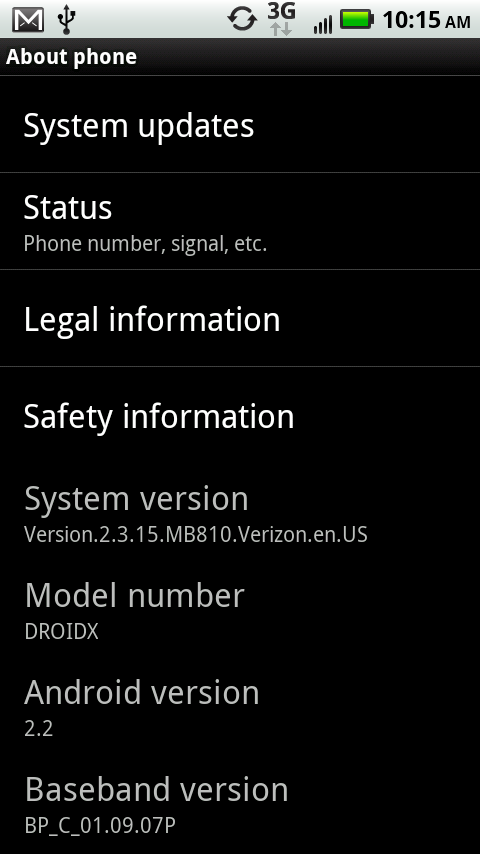
Legal information. Here’s where you can while away the hours reading Google’s terms of service, and the contracts that govern the use of Android. If you’re not a lawyer, you don’t want to read this. In fact, even if you are a lawyer, you don’t want to read this.
Safety information. Spend enough time reading ...
Read now
Unlock full access


 O’Reilly covers everything we've got, with content to help us build a world-class technology community, upgrade the capabilities and competencies of our teams, and improve overall team performance as well as their engagement.I wanted to learn C and C++, but it didn't click for me until I picked up an O'Reilly book. When I went on the O’Reilly platform, I was astonished to find all the books there, plus live events and sandboxes so you could play around with the technology.I’ve been on the O’Reilly platform for more than eight years. I use a couple of learning platforms, but I'm on O'Reilly more than anybody else. When you're there, you start learning. I'm never disappointed.I'm always learning. So when I got on to O'Reilly, I was like a kid in a candy store. There are playlists. There are answers. There's on-demand training. It's worth its weight in gold, in terms of what it allows me to do.