August 2017
Beginner
464 pages
9h 18m
English
Knowing how to navigate Unity’s interface is one thing. Creating an entire game with it is another. In this section of the book, you’ll take what you’ve learned in Part I, and use it to create a 2D game. By the end of this part, you’ll have Gnome’s Well That Ends Well, a side-scrolling action game (see Figure 4-1 for a sneak peek at what the game looks like).

The gameplay of Gnome’s Well is straightforward. The player controls a garden gnome, who’s being lowered by an attached rope into a well. At the bottom of the well there’s some treasure. The catch is that the well is filled with traps that kill the gnome if he touches them.
To begin with, we created a very rough sketch showing how the game would look. We used OmniGraffle, an excellent diagramming application, but the choice of tool doesn’t especially matter—pen and paper is just as easy, and can often be better. The goal is to get a very rough sense of how the game will be put together, as quickly as possible. You can see our Gnome’s Well sketch in Figure 4-2.
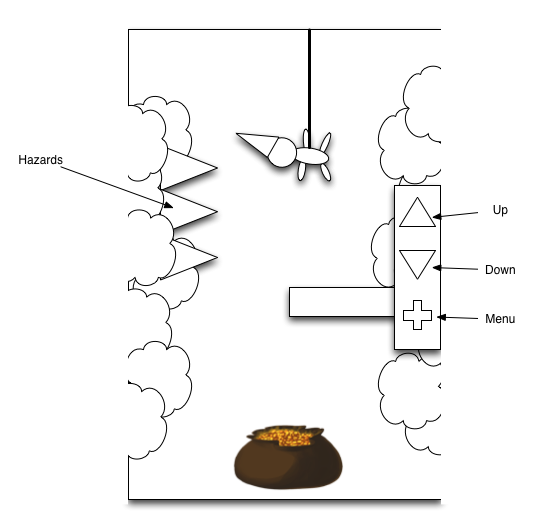
Once we decided on what the game was going to be, we started deciding the overall architecture. We started by working out what ...
Read now
Unlock full access


 O’Reilly covers everything we've got, with content to help us build a world-class technology community, upgrade the capabilities and competencies of our teams, and improve overall team performance as well as their engagement.I wanted to learn C and C++, but it didn't click for me until I picked up an O'Reilly book. When I went on the O’Reilly platform, I was astonished to find all the books there, plus live events and sandboxes so you could play around with the technology.I’ve been on the O’Reilly platform for more than eight years. I use a couple of learning platforms, but I'm on O'Reilly more than anybody else. When you're there, you start learning. I'm never disappointed.I'm always learning. So when I got on to O'Reilly, I was like a kid in a candy store. There are playlists. There are answers. There's on-demand training. It's worth its weight in gold, in terms of what it allows me to do.