Skip to Content
The Photoshop Productivity Series: Customizing Photoshop
book

The Photoshop Productivity Series: Customizing Photoshop

by Dave Cross
January 2014
Intermediate to advanced
61 pages
1h 35m
English
Peachpit Press
Content preview from The Photoshop Productivity Series: Customizing Photoshop

Creating Custom Workspaces

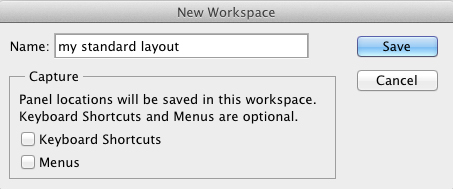
It’s pretty simple to create custom workspaces in Photoshop. First, decide what panels you want showing, where you want them located, and whether they should be collapsed or expanded. Once you’ve done that, choose New Workspace from the Window > Workspace submenu or the Workspace Switcher in the Options Bar. For now, we’ll only worry about saving the appearance of the panels, so name the workspace and click OK (Figure 5.1).
Image

Figure 5.1 Naming a new workspace.

You can create one or multiple workspaces—it’s really up to you. Many people create and use workspaces to reflect the work they do: one for retouching, one with ...

Become an O’Reilly member and get unlimited access to this title plus top books and audiobooks from O’Reilly and nearly 200 top publishers, thousands of courses curated by job role, 150+ live events each month,
and much more.
Start your free trial

You might also like

The Photoshop Productivity Series: Automating Photoshop

The Photoshop Productivity Series: Automating Photoshop

Dave Cross

Publisher Resources

ISBN: 9780133817447