January 2014
Intermediate to advanced
61 pages
1h 35m
English
Tool presets allow you to save the settings for a tool, eliminating the need to always change settings in the Options Bar. This can be a huge time-saver. In theory you could use the existing tool presets, but many of the built-in presets are, shall we say, not terribly practical. You can check out the existing presets by clicking the triangle menu indicator next to the tool icon in the Options Bar. To see only the presets for that tool, check the Current Tool Only box (Figure 6.1). Note that some tools do not have any existing presets.
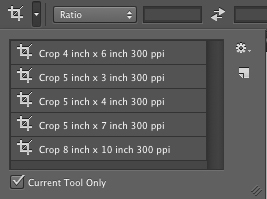
Figure 6.1 Viewing a tool’s presets.
To create a tool preset, let’s look at an example of changing the ...