February 2002
Intermediate to advanced
720 pages
21h 37m
English
You don’t like the default
colors for the background of the caption and footer section, or for
the alternate row in a tabular page. You also wish you didn’t
have to change the ConnectionFile property for every page you create
to point to the same .udl file.
Access’s Tools → Options dialog now includes a Pages page where you can set defaults for any new pages you create. Changing the defaults will have no effect on existing pages.
To see how the color options affect the look of your new pages, follow these steps:
Create a new DAP. Add a table to the page and request a Tabular layout.
Switch to page view. Unless your defaults have already been changed, you’ll see a caption with a steelblue background, and every other row will have a whitesmoke background.
Close the page.
Select Tools → Options from the main Access menu. Click the Pages tab. You’ll see the dialog shown in Figure 13-21.
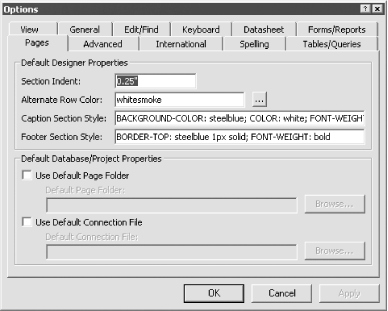
Figure 13-21. The default Pages options
Change the alternate row color to thistle.
Edit the Caption Section Style text box to use plum instead of whitesmoke as the background color. The dialog will now look like Figure 13-22.
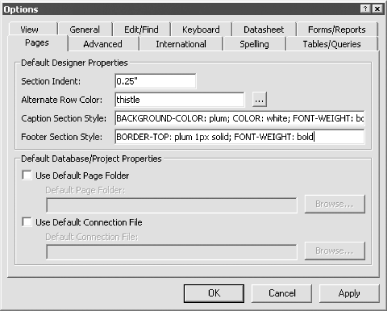
Figure 13-22. The Pages options after editing
Click the OK button to accept the changes and close the dialog.
Create a new page. ...
Read now
Unlock full access


 O’Reilly covers everything we've got, with content to help us build a world-class technology community, upgrade the capabilities and competencies of our teams, and improve overall team performance as well as their engagement.I wanted to learn C and C++, but it didn't click for me until I picked up an O'Reilly book. When I went on the O’Reilly platform, I was astonished to find all the books there, plus live events and sandboxes so you could play around with the technology.I’ve been on the O’Reilly platform for more than eight years. I use a couple of learning platforms, but I'm on O'Reilly more than anybody else. When you're there, you start learning. I'm never disappointed.I'm always learning. So when I got on to O'Reilly, I was like a kid in a candy store. There are playlists. There are answers. There's on-demand training. It's worth its weight in gold, in terms of what it allows me to do.