June 2008
Intermediate to advanced
488 pages
15h 3m
English
This chapter provides an overview of Dojo's architecture, takes you through installing Dojo, introduces some domain-specific jargon, runs through the bootstrapping process, and then provides some example code that should whet your appetite for the chapters that follow. Like any other introduction, much of this chapter paints in broad strokes and sets the tone for the rest of the book. Hopefully, you'll find it helpful as you begin your journey with the toolkit.
As you're about to see, describing Dojo as a toolkit is no mere coincidence. In addition to providing a JavaScript standard library of sorts, Dojo also packs a collection of feature-rich, turnkey widgets that require little to no JavaScript coding at all, build tools, a testing framework, and more. This section provides an overview of Dojo's architecture from a broad point of view, shown in Figure 1-1. As you'll see, the organization for the rest of this book is largely driven by the toolkit's architecture. Even though DojoX is displayed as an independent entity from Dijit, DojoX resources could also be built upon Dijit resources, just as your own custom widgets could leverage any combination of Dijit and DojoX resources.
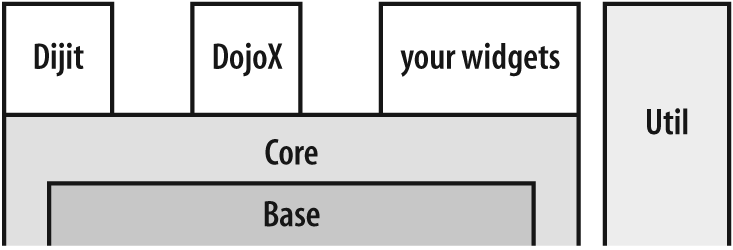
Figure 1-1. One depiction of how the various Dojo components can be thought of as relating to one another
The kernel of Dojo is Base, an ultra-compact, ...
Read now
Unlock full access


 O’Reilly covers everything we've got, with content to help us build a world-class technology community, upgrade the capabilities and competencies of our teams, and improve overall team performance as well as their engagement.I wanted to learn C and C++, but it didn't click for me until I picked up an O'Reilly book. When I went on the O’Reilly platform, I was astonished to find all the books there, plus live events and sandboxes so you could play around with the technology.I’ve been on the O’Reilly platform for more than eight years. I use a couple of learning platforms, but I'm on O'Reilly more than anybody else. When you're there, you start learning. I'm never disappointed.I'm always learning. So when I got on to O'Reilly, I was like a kid in a candy store. There are playlists. There are answers. There's on-demand training. It's worth its weight in gold, in terms of what it allows me to do.