July 2009
Beginner
416 pages
12h 12m
English
Man, you gotta hand it to Apple. What on earth can you put into your cellphone in its third annual version that it didn't have before—and that no other phone has? That's right. A compass.
There's an actual magnetometer in the iPhone 3GS—a magnetic-field sensor. When you open the Compass app, you get exactly what you'd expect: a classic Boy Scout wilderness compass that always points north.
Except it does a few things the Boy Scout compasses never did. Like displaying a
digital readout of your heading (shown below, right) or displaying your precise geographical coordinates at
the bottom, or offering a choice of true north (the "top" point of
the Earth's rotational axis) or magnetic north (the spot traditional
compasses point to, which is about 11 degrees away from true north). (Tap the  to specify which north you prefer.)
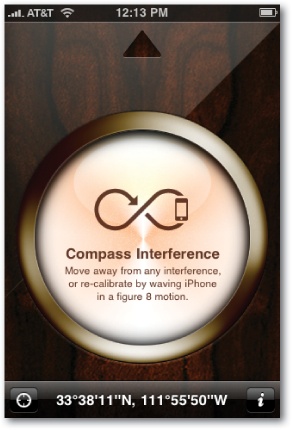
The very first time you use the Compass (or anytime you're standing near something big and metal—or magnetic, like stereo speakers), you get the little message shown here at left. It's telling you to move away from the big metal thing, and to de-confuse the Compass by moving it through 3-D space in a big figure 8. (Yes, you look like a deranged person, but it's good exercise.)
Once the Compass is working, hold it roughly parallel to the ground, and ...
Read now
Unlock full access


 O’Reilly covers everything we've got, with content to help us build a world-class technology community, upgrade the capabilities and competencies of our teams, and improve overall team performance as well as their engagement.I wanted to learn C and C++, but it didn't click for me until I picked up an O'Reilly book. When I went on the O’Reilly platform, I was astonished to find all the books there, plus live events and sandboxes so you could play around with the technology.I’ve been on the O’Reilly platform for more than eight years. I use a couple of learning platforms, but I'm on O'Reilly more than anybody else. When you're there, you start learning. I'm never disappointed.I'm always learning. So when I got on to O'Reilly, I was like a kid in a candy store. There are playlists. There are answers. There's on-demand training. It's worth its weight in gold, in terms of what it allows me to do.