Skip to Content
Microsoft® Visual Studio® 2010 Unleashed
book

Microsoft® Visual Studio® 2010 Unleashed

by Mike Snell, Lars Powers
August 2010
Intermediate to advanced
1224 pages
34h 17m
English
Sams
Content preview from Microsoft® Visual Studio® 2010 Unleashed

Publishing a Project with ClickOnce

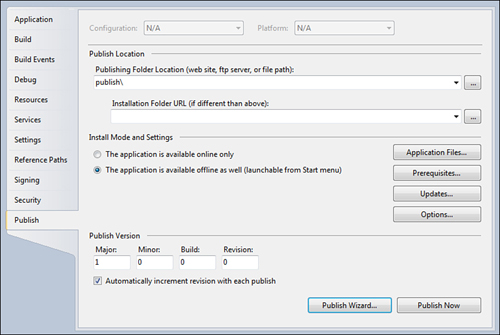
You create a ClickOnce install by first configuring the correct “publish” options for your project. These are all located on the project properties dialog box, under the Publish tab (see Figure 12.1).

Figure 12.1 Setting ClickOnce publication properties.
image

You can see that this property page holds a variety of settings including where to host the ClickOnce installation, and how we want to handle the offline versus online aspects of ClickOnce. To make things easy for our first deployment, we let the Publish Wizard walk us through setting these options. Click on the Publish Wizard button at the bottom of the Publish ...

Become an O’Reilly member and get unlimited access to this title plus top books and audiobooks from O’Reilly and nearly 200 top publishers, thousands of courses curated by job role, 150+ live events each month,
and much more.
Start your free trial

You might also like

Microsoft® Visual Studio® 2012 Unleashed, Second Edition

Microsoft® Visual Studio® 2012 Unleashed, Second Edition

Mike Snell, Lars Powers
Professional Visual Studio® 2008

Professional Visual Studio® 2008

Nick Randolph, David Gardner
Professional C# 5.0 and .NET 4.5.1

Professional C# 5.0 and .NET 4.5.1

Christian Nagel, Jay Glynn, Morgan Skinner
ASP.NET 4 Unleashed

ASP.NET 4 Unleashed

Stephen Walther, Kevin Hoffman, Nate Dudek

Publisher Resources

ISBN: 9780132121057Purchase book