Skip to Content
Microsoft® Visual Studio® 2010 Unleashed
book

Microsoft® Visual Studio® 2010 Unleashed

by Mike Snell, Lars Powers
August 2010
Intermediate to advanced
1224 pages
34h 17m
English
Sams
Content preview from Microsoft® Visual Studio® 2010 Unleashed

Using the Extension Manager

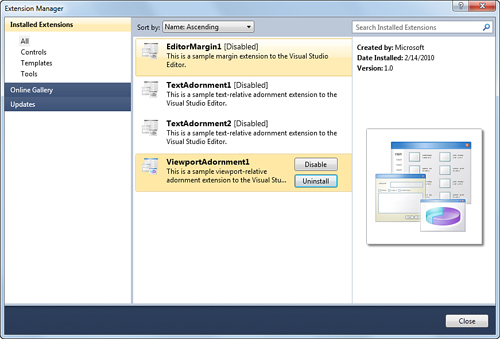
Before we detailed the editor extension points, we briefly mentioned the Extension Manager and its role. The manager is launched via the Tools menu, Extension Manager. The UI used by the extension manager is clean and simple (see Figure 16.6).

Figure 16.6 The Visual Studio Extension Manager.
image

The left pane manages the mode of the manager. You can manage installed extensions, browse extensions available online, or view updates available to any currently installed extensions. In Figure 16.6 you can clearly see all of the extensions that were installed as a result of running the four different extension template projects. ...

Become an O’Reilly member and get unlimited access to this title plus top books and audiobooks from O’Reilly and nearly 200 top publishers, thousands of courses curated by job role, 150+ live events each month,
and much more.
Start your free trial

You might also like

Microsoft® Visual Studio® 2012 Unleashed, Second Edition

Microsoft® Visual Studio® 2012 Unleashed, Second Edition

Mike Snell, Lars Powers
Professional Visual Studio® 2008

Professional Visual Studio® 2008

Nick Randolph, David Gardner
Professional C# 5.0 and .NET 4.5.1

Professional C# 5.0 and .NET 4.5.1

Christian Nagel, Jay Glynn, Morgan Skinner
ASP.NET 4 Unleashed

ASP.NET 4 Unleashed

Stephen Walther, Kevin Hoffman, Nate Dudek

Publisher Resources

ISBN: 9780132121057Purchase book