August 2010
Intermediate to advanced
1224 pages
34h 17m
English
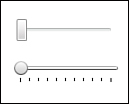
The capability to customize the look of a control in WPF, without losing any of its built-in functionality, is one of the huge advantages that WPF brings to the development scene. Consider the two slider controls in Figure 19.16: The top is the default style, and the bottom represents a restyled slider. Functionality is identical. We have simply changed the appearance of the control.
Figure 19.16 The standard Slider (top) and a re-styled Slider (bottom).
Style is an actual class (in the System.Windows namespace) that is used in association with a control; it groups property values together to enable you, as a developer, to ...