December 1997
Beginner
213 pages
4h 24m
English
Adding names to your workspace tabs helps organize your workspace. In addition to naming tabs, you can create additional tabbed pages. You can select colors for tabs and move databases from one tabbed page to another by dragging the database to a different tabbed page.
To name a tab or change its color, follow these steps:
Right-click the tab of the current page (see Figure 2.2).
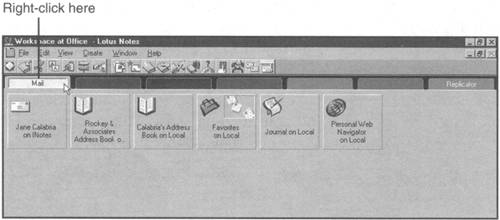
A pop-up menu appears. Select Workspace Properties.
The Properties box appears, as shown in Figure 2.3. In the Workspace page name: text box, type the name ...