Skip to Content
Ten Minute Guide to Lotus Notes® 4.6
book

Ten Minute Guide to Lotus Notes® 4.6

by Dorothy Burke, Jane Calabria
December 1997
Beginner
213 pages
4h 24m
English
Que
Content preview from Ten Minute Guide to Lotus Notes® 4.6

Creating Attachments

To attach a file to a Lotus Notes mail message, do the following:

  1. Create the mail message. Make sure your insertion point (cursor) is in the message body at the exact point at which you want the attachment to appear.

  2. Choose File, Attach or click the File Attach SmartIcon. The Create Attachment(s) dialog box appears, as shown in Figure 17.1.
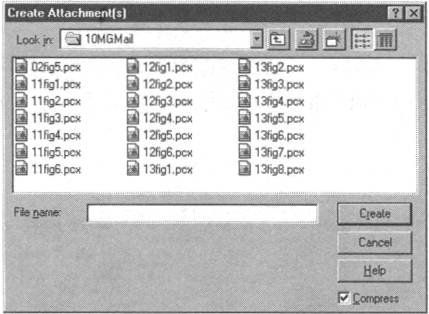
    Figure 17.1. The Create Attachment(s) dialog box.

  3. In the Create Attachment(s) dialog box, enter the name of the file you want to attach in the File Name box and then specify its location by choosing the correct drive and directory, or folder. Or, specify the location first and then select ...

Become an O’Reilly member and get unlimited access to this title plus top books and audiobooks from O’Reilly and nearly 200 top publishers, thousands of courses curated by job role, 150+ live events each month,
and much more.
Start your free trial

You might also like

IBM Lotus Notes 8.5 User Guide

IBM Lotus Notes 8.5 User Guide

Karen Hooper
Professional Visual Studio® 2008

Professional Visual Studio® 2008

Nick Randolph, David Gardner

Publisher Resources

ISBN: 0789715368Purchase book