January 2008
Beginner
504 pages
16h 56m
English
If you want to keep an eye on a limited number of articles and other pages (say a hundred or so), then the watchlist that Wikipedia provides each registered editor probably meets all your needs. Most active editors use this watchlist. You simply tell Wikipedia you want to monitor selected pages—articles, user talk pages, whatever. Then you run a report whenever you want to see if anyone has edited those pages since your last report.
In Wikipedia, the term watchlist sometimes refers to the list of pages you’ve told Wikipedia you want to watch, and sometimes to the report that Wikipedia generates when you click the “my watchlist” link in your screen’s upper right. For clarity, in this chapter “watchlist” refers to the list of watched pages, and “watchlist report” is what you get when you click the “my watchlist” link.
Wikipedia offers you three different watchlist reports: standard, expanded, and enhanced. The expanded and enhanced reports build on the standard report. But if you’re like many editors, the standard watchlist report (Figure 6-2) may meet all your monitoring needs. You get to it by clicking “my watchlist” (one of the six standard links in the screen’s upper right corner, when you’re logged on).
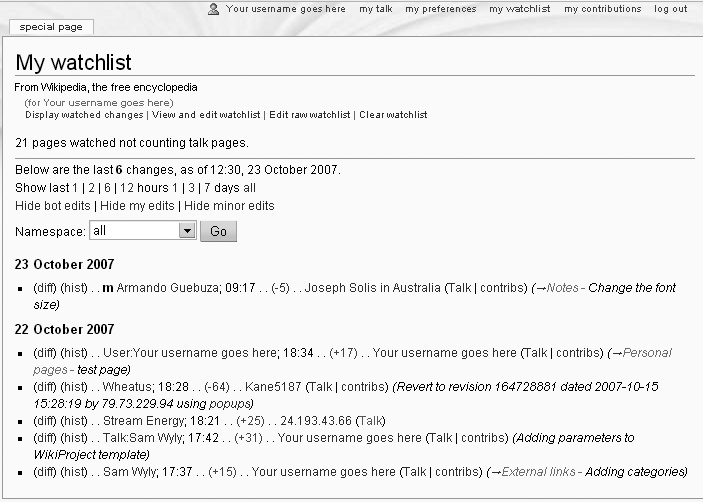
Figure 6-2. The standard watchlist report starts out in the “Display watched changes” view shown here. The number of ...
Read now
Unlock full access


 O’Reilly covers everything we've got, with content to help us build a world-class technology community, upgrade the capabilities and competencies of our teams, and improve overall team performance as well as their engagement.I wanted to learn C and C++, but it didn't click for me until I picked up an O'Reilly book. When I went on the O’Reilly platform, I was astonished to find all the books there, plus live events and sandboxes so you could play around with the technology.I’ve been on the O’Reilly platform for more than eight years. I use a couple of learning platforms, but I'm on O'Reilly more than anybody else. When you're there, you start learning. I'm never disappointed.I'm always learning. So when I got on to O'Reilly, I was like a kid in a candy store. There are playlists. There are answers. There's on-demand training. It's worth its weight in gold, in terms of what it allows me to do.