January 2008
Beginner
504 pages
16h 56m
English
This tab has five settings, counting that last set of checkboxes as one setting, as seen in Figure 20-11. These settings affect what happens when you use Wikipedia’s internal search engine. (For why you may not want to use that engine for searches, see Searching Wikipedia.)

Figure 20-11. The Search tab lets you tailor the results from Wikipedia’s internal search engine. The fourth of these settings, not completely shown, is a listing of all namespaces that you want to include in all your searches.
Hits per page isn’t as useful as it sounds. Only the top handful of hits are normally worth looking at anyway.
If you fill in Lines per hit with, say, 5 lines, Wikipedia won’t show the context of the search term if it occurs after line 5 on the page. But testing shows that this option makes no difference: Whether set to 5 or 5000, the results are the same. (See the Meta page Help:Preferences for more information.)
Context per line means the amount of text the search engine shows you when it finds the word you’re looking for. Figure 20-12 shows the difference between the initial setting of 50 and a setting of 200, which shows you a lot more of the surrounding text. This context helps you decide whether it’s worth visiting the result page.
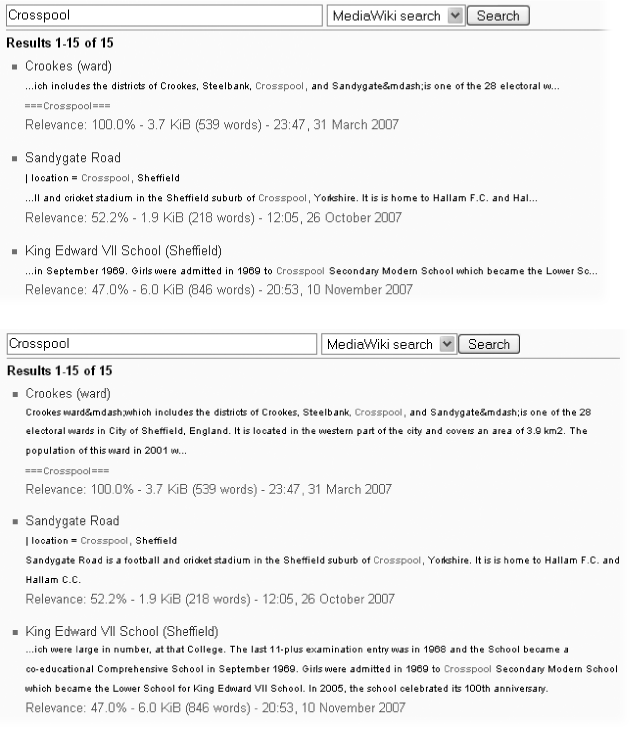
Figure 20-12. On the top is a search on the word “Crosspool,” ...
Read now
Unlock full access


 O’Reilly covers everything we've got, with content to help us build a world-class technology community, upgrade the capabilities and competencies of our teams, and improve overall team performance as well as their engagement.I wanted to learn C and C++, but it didn't click for me until I picked up an O'Reilly book. When I went on the O’Reilly platform, I was astonished to find all the books there, plus live events and sandboxes so you could play around with the technology.I’ve been on the O’Reilly platform for more than eight years. I use a couple of learning platforms, but I'm on O'Reilly more than anybody else. When you're there, you start learning. I'm never disappointed.I'm always learning. So when I got on to O'Reilly, I was like a kid in a candy store. There are playlists. There are answers. There's on-demand training. It's worth its weight in gold, in terms of what it allows me to do.